My Git Flow, part 3. I stopped painting cells in Confluence: the release stage is now computed by a portal and an MCP
In the first part of this series I described how I organise release branches and why I think release planning is the responsibility of management, not of developers. In the second I described how I turned the rules for working with Git, Jira and CI/CD into automatic checks.
But one question was still left unanswered by all those rules and scripts:
What stage is a given release in right now?
It sounds like a trifle. There are the branches develop/1.65.0, alpha/1.65.0, beta/1.65.0, prod/1.65.0. There is GitLab, the merge request history, the checks and the automatic build. But four branches do not mean that the release has gone through all four stages: they are all created at once, when the release is set up.
In practice the answer was known to the people who worked on the project constantly. You had to attend the dailies, follow the testing, watch what was being merged and where. To avoid losing the picture, I started a table in Confluence. Later two tools appeared: a web portal that shows me the state of releases, and the MCP Delivery Manager, which answers questions for a coding agent.
Both grew out of one idea: if a release is moved forward through Git, its state can already be reconstructed from the Git history. There is no need to keep it in a human’s head as well.
The green cell I had to paint by hand
In my Git Flow every release has its own chain of branches. For example:
develop/1.65.0 → alpha/1.65.0 → beta/1.65.0 → prod/1.65.0
The stages are not a universal list for every team. For an Android app it may be develop → alpha → beta → prod, for a backend develop → test → stage → prod. Development is separated from distribution; how many distribution steps you need depends on the product.
Several versions live at the same time. One is being developed, another is being tested, a third is going through the beta stage, a fourth is already in production. In the earlier article I explained why this is needed and why fixes from older versions must always make it into newer ones.
But keeping track of the whole picture was inconvenient.
I made an ordinary Confluence table: rows are release numbers, columns are stages and operations. When a release moved to the next step, I wrote in the date, removed the green fill from one cell and painted another. At least that showed where each version was.
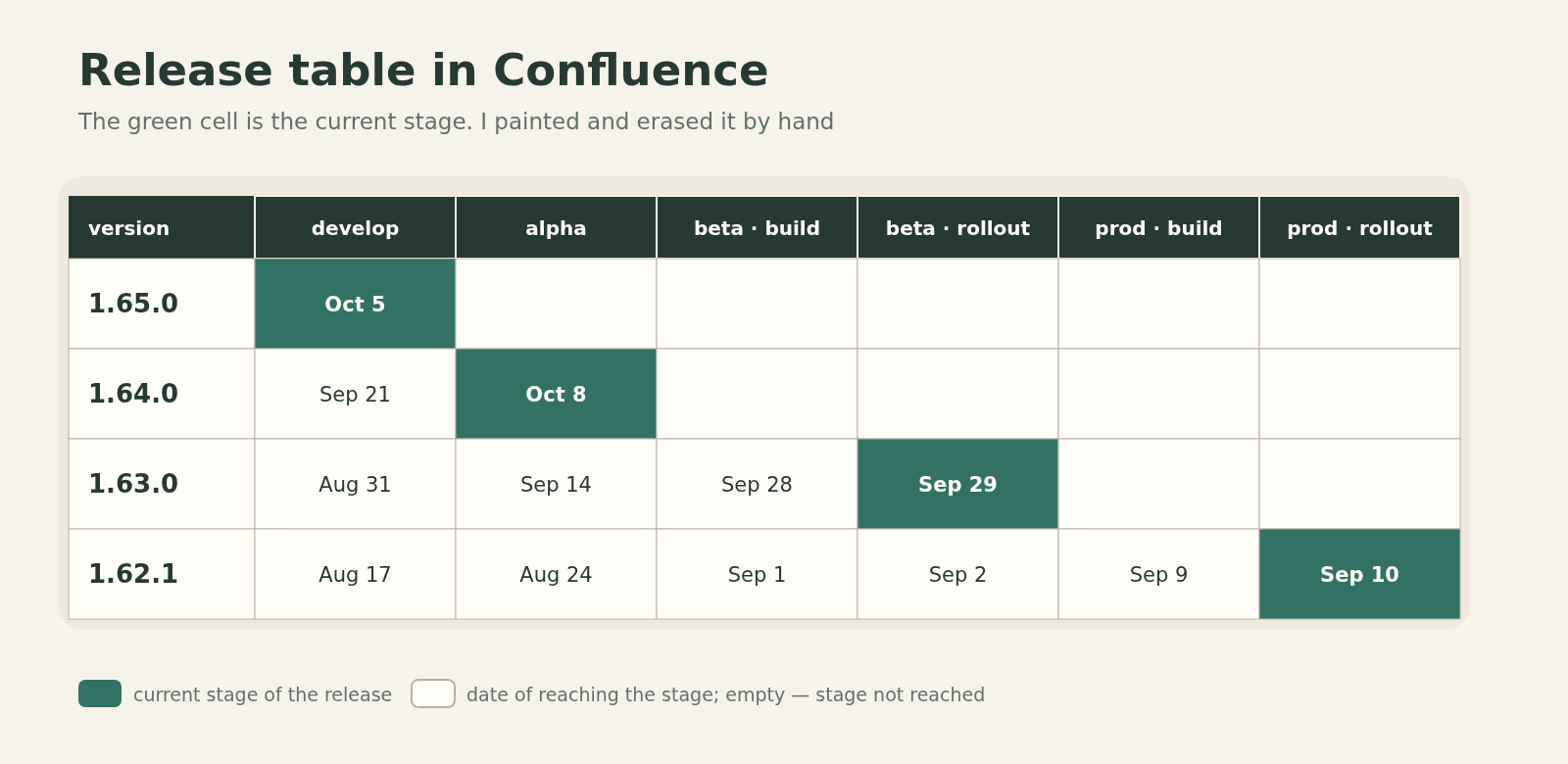
The problem was not that the table was complicated. The problem was that its accuracy depended on me. If I forgot to update an entry, it no longer reflected the real state. And the process of moving releases forward did not depend on this table in any way.
The situation was strange: GitLab already recorded the actions, and after that I opened Confluence and wrote down by hand that those actions had happened.
At some point I asked myself: why am I copying information from one tool to another if it can be computed?
What counts as evidence of a stage transition
It is important not to confuse the existence of a branch with the state of a release.
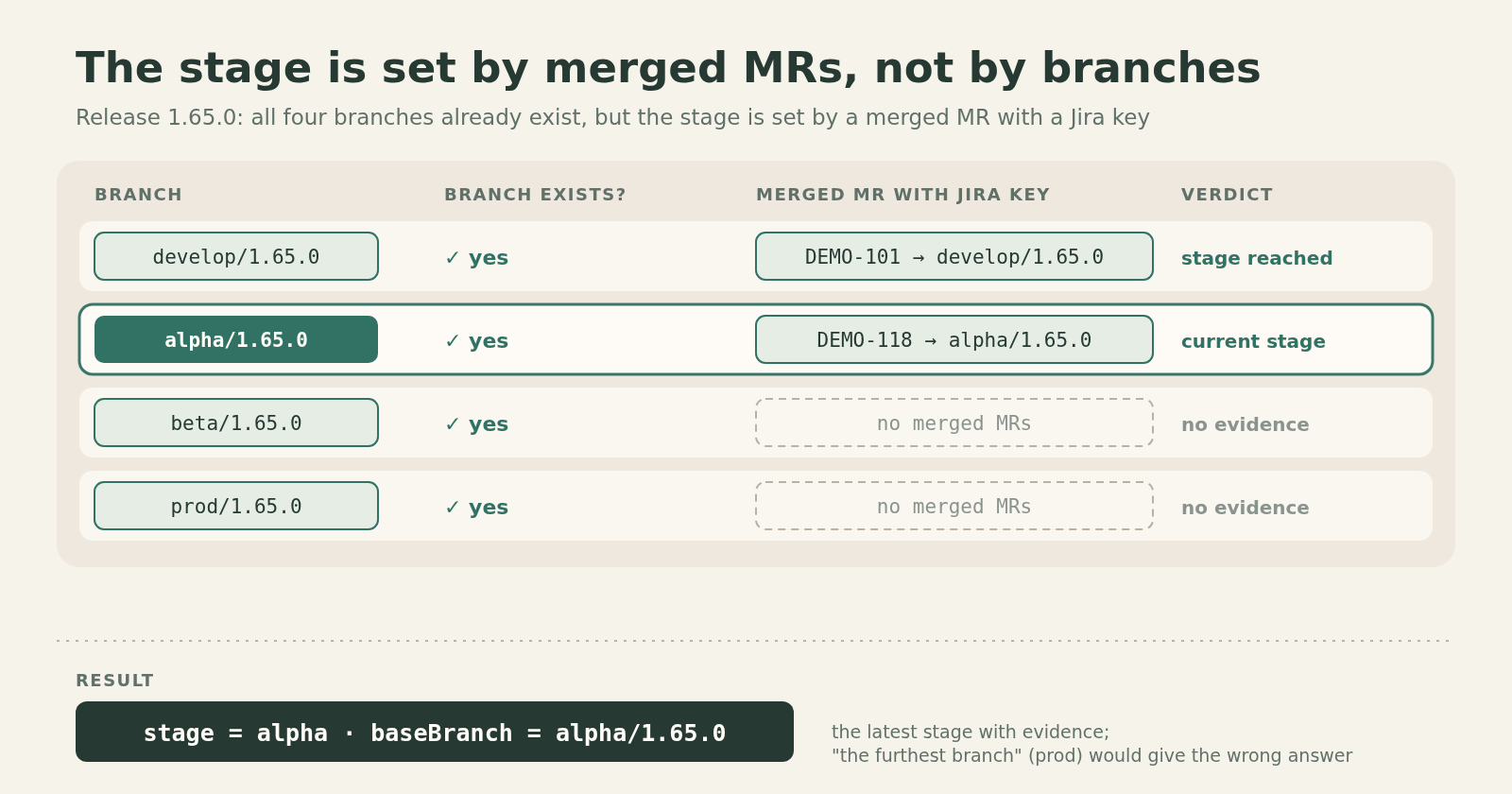
When a new release is set up, the branches of all its stages are created at once. So the algorithm “find the latest existing branch” does not work. prod/1.65.0 exists from day one, even if the release has only just started being developed.
A different signal is needed: the action by which, according to our process, a release is moved forward.
For us that action is a merged merge request into the branch of the corresponding stage. The target branch is named <stage>/<version>, and the MR is linked to a Jira task. For example, if a matching MR was merged into alpha/1.65.0, that is evidence that the alpha stage was reached. If such an MR later appeared in beta/1.65.0, the release reached beta.
In the Delivery Manager implementation the logic works like this: the tool finds merged MRs with a Jira key in the title, branch name or description, matches their target branches against the release and the order of stages, and picks the latest stage that has such evidence.
Release 1.65.0

Branch                Merged MR as evidence?

develop/1.65.0        yes
alpha/1.65.0          yes                ← current stage
beta/1.65.0           no
prod/1.65.0           no

Result: stage = alpha, baseBranch = alpha/1.65.0
This is not a universal property of Git. It is our definition of a release state, and it works thanks to a process agreed in advance. If a team moves stages in a different way, it will need different evidence.
And I am stating this definition only in hindsight. First I had the idea of getting rid of the table. The formal algorithm and its limits took shape while I was building the tools.
A portal instead of a table
I am an Android developer, I did a little backend work, but I had never written web portals. I had long had the idea of a convenient visualisation of the release process. I managed to carry it through to an implementation when coding agents appeared.
First I spent quite a while discussing the idea in ChatGPT: I explained Git Flow, the Confluence table and the existing checks. As a result I got an implementation prompt, which I handed to a coding agent. That is how my gitlab-panel began to appear.
I wanted an equivalent of the old table, but not just in a prettier interface. I needed it to build the picture itself from GitLab data.
For that I had to describe projects, sets of stages, releases and the history of their transitions. Then came the import of releases from GitLab, and then the matrix itself. In March 2026 the project’s git history already shows a merge-request-based import of transitions, and later a matrix with arrows and links between releases.
I will leave the detailed development history of the portal for a separate piece. What matters here is what came out from the point of view of the release process.
In the matrix, rows are versions and columns are stages. You can see at once that one release is still in development, another is being tested, a third is approaching production. Between the stages there are arrows showing the state of change transfer.
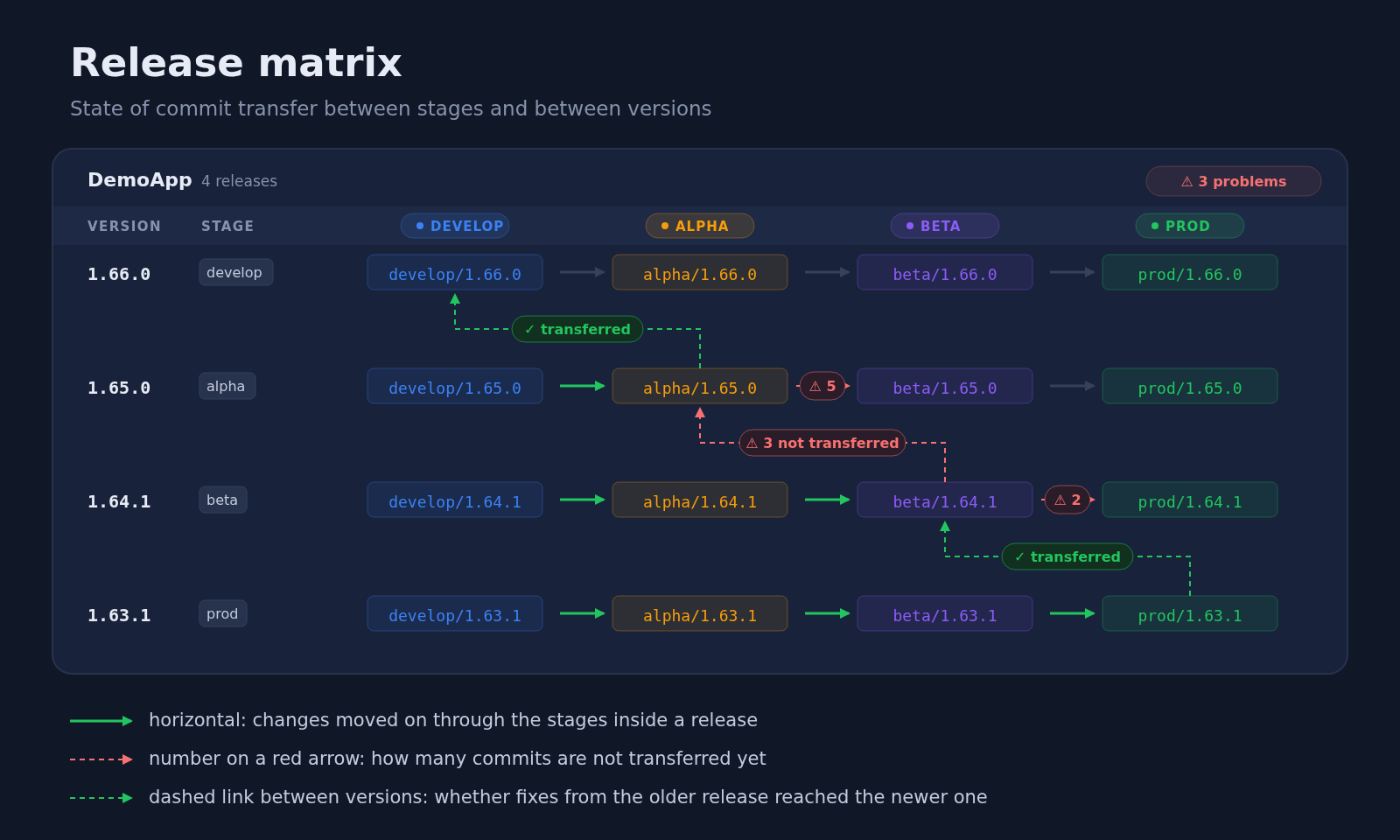
What I especially like is that the matrix shows two directions of change flow.
The first is horizontal: inside one release, changes go from development through the distribution stages to production.
The second is between versions. In my Git Flow, if a bug was fixed in an earlier release, that fix must end up in the newer one. Otherwise the old bug comes back in the next release.
This rule used to be an obligation of the team. Now the portal can check it against Git: it compares the branches of neighbouring releases and finds commits that are present in the older version but absent from the newer one. Merge commits are filtered out of the comparison.
For example, 1.24.0 is still being tested while development of 1.25.0 is already under way. Several bugs were fixed in 1.24.0, and after the checks finished it was moved to the next stage. The fixes must go into 1.25.0; the development of the new version does not have to stop because of it. If the transfer has not been made yet, the vertical link in the matrix shows the problem.
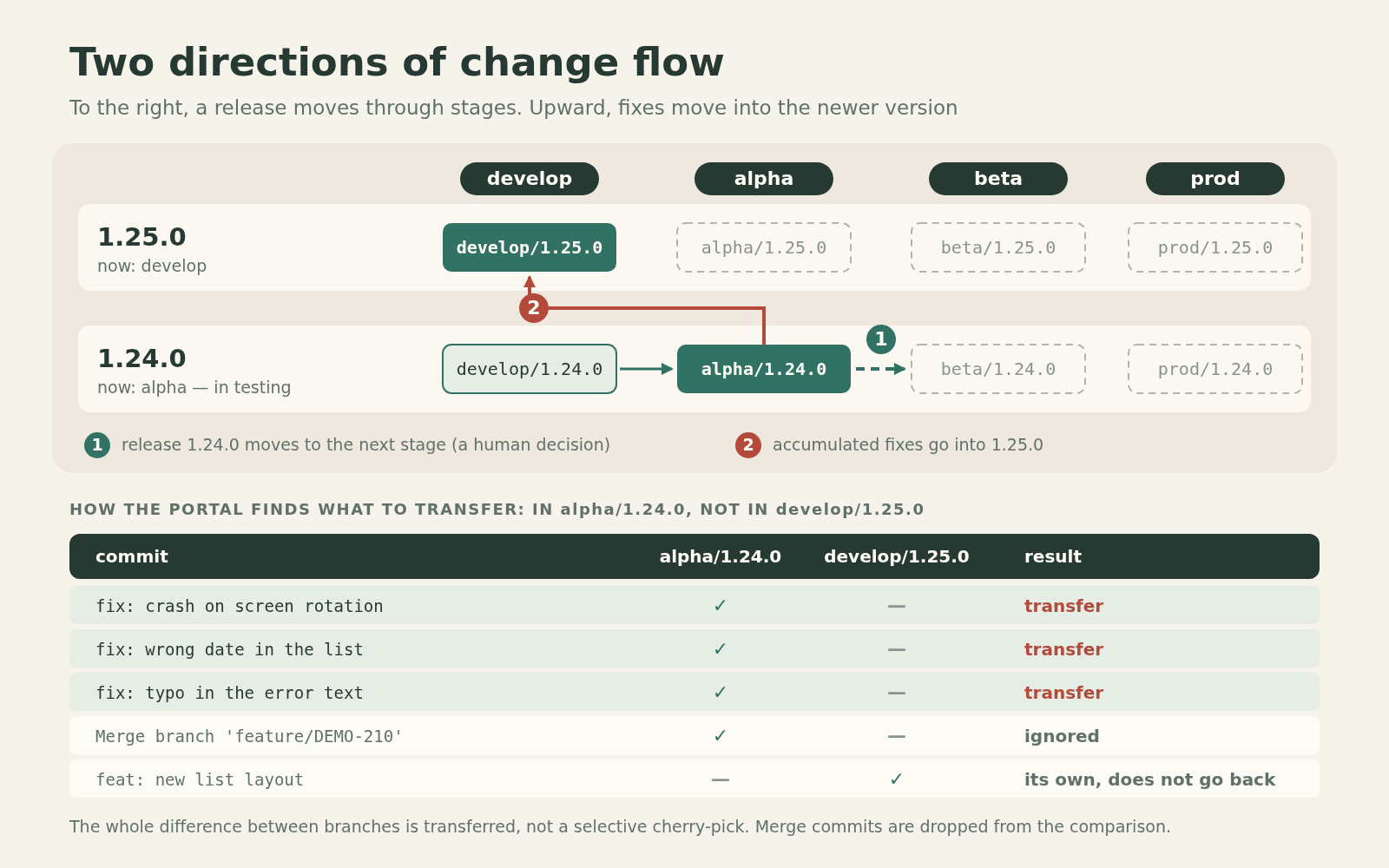
I no longer have to reconstruct by hand whether I forgot to carry the fixes forward. The discrepancy is visible right on the diagram.
Press the arrow, get an MR for the pour
But just showing the difference is not enough. If the portal knows from where and to where the changes need to be transferred, why not hand it the routine part of the operation?
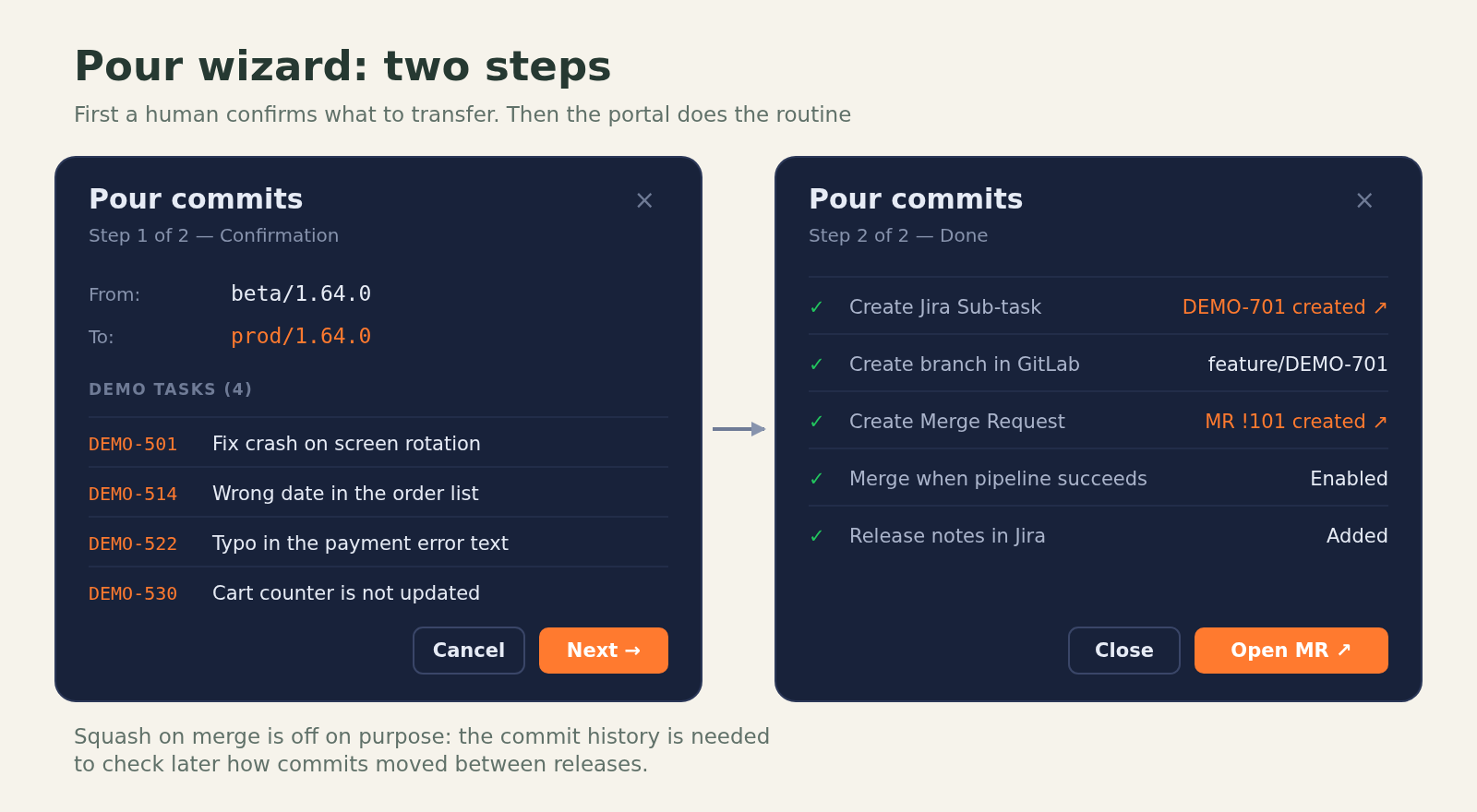
That is how the “pour” wizard appeared. “Pouring” is our word for transferring changes between stage branches or between releases. It has two steps.
First the portal shows the source, the target branch and the set of changes to be transferred. I see exactly what I am about to do and confirm it.
Then execution starts. The portal uses an existing Jira task for the pour or creates a sub-task under the given story, fills in the required fields and moves the task to CodeReview. If the status transition fails, the process stops. Next a temporary feature/<KEY> is created from the source stage branch, and a merge request from it into the target one.
The MR gets a list of the commits that are going to be transferred. For such a pour we do not enable squash: it is important for us to keep the history of changes, which can later be used to check how commits moved between releases. The portal also tries to enable merge after a successful pipeline, writes the MR link and the list of changes into a Jira comment, and shows that the pour is in progress.
Important: this does not mean that every click is guaranteed to end in a merge. Automatic merging depends on the pipeline state and on what GitLab allows; some steps may need attention.
Here it is essential to me to keep the split of responsibility from the first article. The portal does not decide whether it is time for a release to move to the next stage.
When development is finished and I am responsible for handing the release over to testing, the decision is mine. After testing, the decision is made by the corresponding role: a tester reports readiness, a delivery manager plans further progress and creates the pour task. I get that task and launch the technical execution.
If the task has already been created by the delivery manager, the wizard uses its number. If I am the one initiating the pour, I can specify a story and the portal will create a sub-task. The responsibility for the decision stayed with a human; what is automated is the actions that follow the decision.
Today I use the portal exactly for this kind of work: create a release, look at the state, transfer changes across stages or between versions. I no longer need to open GitLab by hand and run a sequence of git commands for this.
The second problem: the coding agent did not know where the release was either
In parallel, my usual development process changed. I started doing a large share of tasks through coding agents. And suddenly I found that the same problem with the current stage had come up again, only now on the other side of the dialogue.
I used to tell the agent something like this:
Update
develop/1.65.0. Createfeature/<task key>from it. Implement the task. Then make an MR intodevelop/1.65.0.
But tomorrow the same release could already be in alpha, and a bit later in beta. So I had to know the current stage myself and each time tell the agent the right branches.
That is exactly what I had just got rid of with the portal, for myself. It turned out absurd: for a human the stage was already computed, while the agent kept getting it from my words.
I did not want the agent to guess the state of a release from a local checkout, pick the default branch, or memorise the quirks of each project in a prompt. It needed a tool that answers one concrete question: where do I start work on this Jira task, and where do I send the MR afterwards?
That is how the MCP tool I called Delivery Manager appeared.
The name can be misleading. It does not replace a real delivery manager. A human still plans releases and sets the Fix Version in Jira. The MCP does not choose when to ship a feature. It receives a task that is already planned and works out how to handle it within the existing release process.
From the algorithm in the portal to a tool for the agent
The portal and Delivery Manager are different projects with different codebases. I did not make the MCP depend on a running portal.
When Delivery Manager was needed, I asked the agent that worked on the portal to explain where exactly in the source the stage-detection algorithm lives: files, methods, logic. I handed the resulting note to another agent, the one building the MCP. It carried the domain idea over into the new tool.
This is an important detail: the two implementations now exist separately. They rely on one process and on the GitLab history, but there is no automatic code synchronisation between them.
In the MCP the order of a project’s stages is established from its release branches and the known stage names, then fixed in the space settings. In the portal there are separate screens for this. That is a compromise I accepted when moving the logic over.
For the agent the contract turned out small. A human has already set the Fix Version in the Jira task. Given the project, the version and the task key, the MCP queries GitLab, determines the current stage and returns ready parameters for the work.
For example, schematically, the answer might look like this:
# Fictional example; a shortened illustration of the contract,
# not the literal JSON response of the MCP.
fixVersion: 1.65.0
currentStage: alpha
baseBranch: alpha/1.65.0
baseBranchExists: true
featureBranch: feature/DEMO-123
mergeRequest:
  targetBranch: alpha/1.65.0
In other words, the agent does not need to understand why 1.65.0 is on alpha today. It is enough to get a verified baseBranch and the MR target branch.
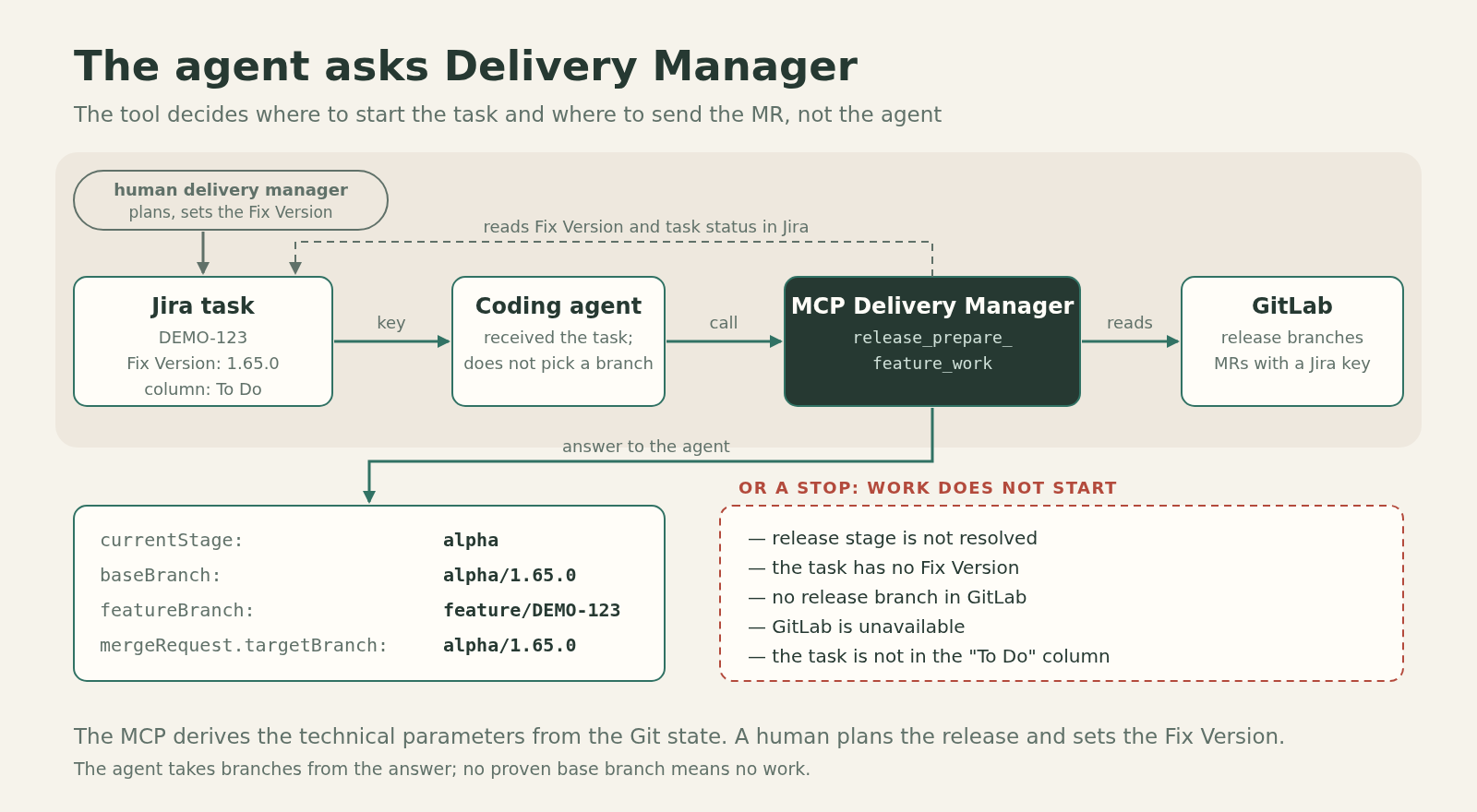
These values can also be substituted into templates for further work as {{baseBranch}}, {{featureBranch}}, {{mergeRequestTargetBranch}}. But the mechanism that executes such templates is a separate tool, which I will not describe here. For this article what matters more is where the values come from.
I set a hard rule for the agent: it does not choose the base release branch on its own. The only source is the Release MCP.
If the task has no Fix Version, the current stage cannot be determined, the needed branch is missing, or GitLab is unavailable, work must not go on by guesswork. There is also a readiness check on the task itself: for example, if the task is not in the “To Do” status, it cannot be considered prepared for implementation.
I had a quite down-to-earth case: I forgot to move a task to the right status myself, and the work stopped. That is not a tool error. It did exactly what I wanted from it: it refused to bypass the process just to start writing code at any cost.
Where the human remains, and where the algorithm can be wrong
I would like to say that now everything works by itself, but that would be the wrong conclusion.
First, the rules of the release process are still set by people. The delivery manager plans versions and the contents of a release. Those responsible for the stages decide when to move a release on. I define which actions the tools are allowed to take, what counts as evidence of a stage, and in which cases they must stop.
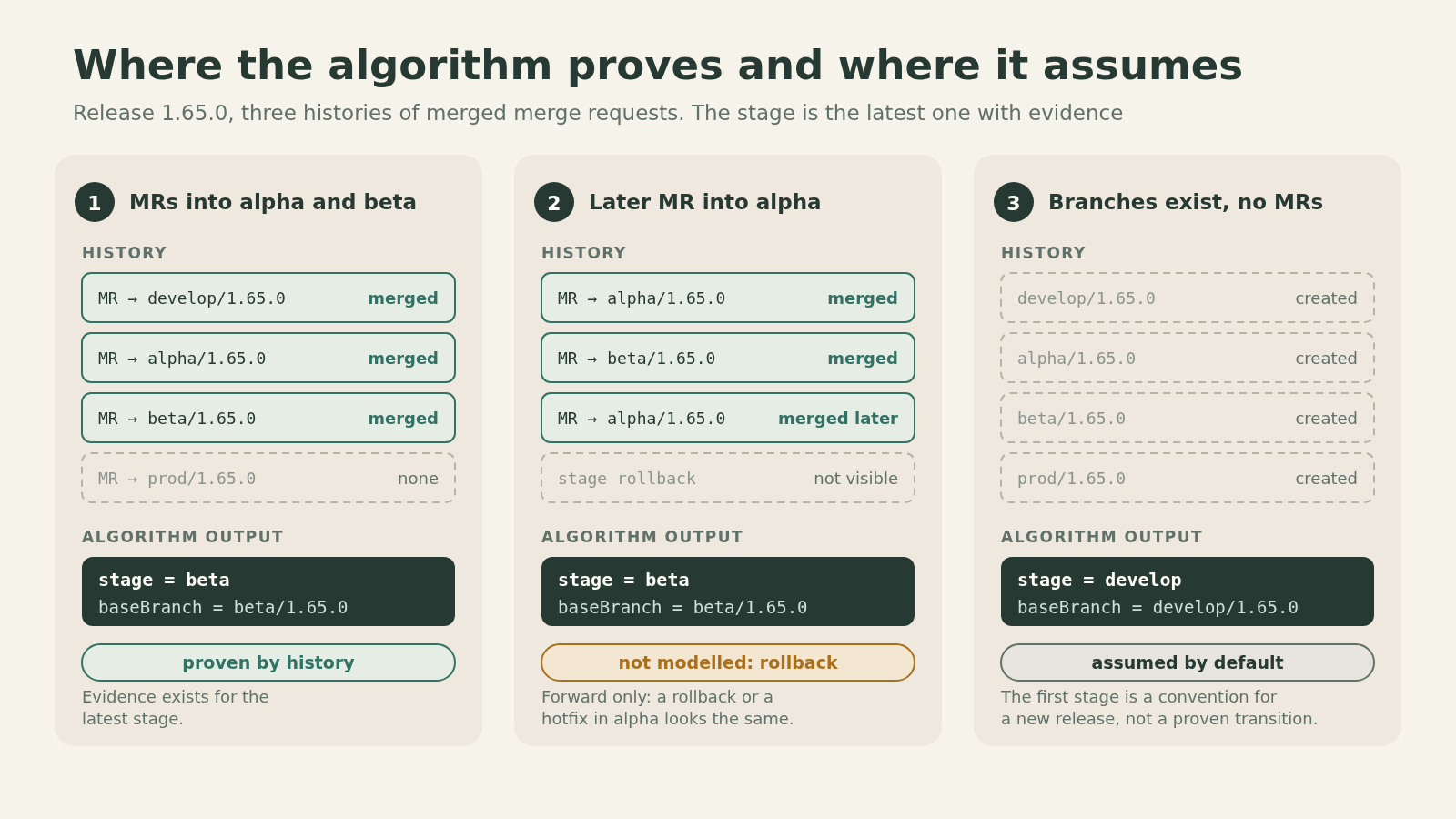
Second, the state computation rests on assumptions. In the current implementation there are three.
The stage is determined by the furthest confirmed transition. If there is a merged MR into beta/<version>, the algorithm considers that the release reached beta. It does not try to reconstruct arbitrary business logic from task names.
A release moves only forward. My model has no provision for rolling a version back from beta to alpha. So the latest confirmed stage stays the current one. If another team can officially roll stages back, such an algorithm is no longer enough.
If there are no confirming MRs yet, the first existing stage is taken. This matters for a freshly created release: all its branches already exist, but no pour has happened yet. We accept that it is in the initial stage. This is a deliberate fallback, not a proven fact of transition.
There are engineering limitations too. The portal and the MCP have two separate implementations of the algorithm, so a change in the rules has to be carried over between them in a coordinated way. The stage check did not become part of the old jira:check from the second article: it is now done by other tools. And I did not measure by how many hours the support of releases was reduced, so I will not promise percentages of saved time here.
But one concrete part of my work has changed, and it is easy to describe without numbers. I used to remember the release stage myself, update the table, explain branches to a person or an agent, and run a sequence of actions in GitLab. Now the state can be obtained from history, the portal shows discrepancies, and the agent asks the MCP instead of asking me.
What changed over three parts
When I first introduced this Git Flow, it was important for me to separate responsibilities. Development should not have to rework releases by hand because of planning problems. Branching and the rule for moving changes forward helped hold that boundary.
Then I got tired of watching whether people kept the agreements, and started moving verifiable rules into GitLab CI/CD. That was the second part of the story.
But a process and automatic checks alone turned out not to be enough. Between them there remained knowledge nobody had formalised: where a release is right now. I kept it in Confluence and in my own head for a long time, and then discovered that the answer was already contained in the history of our process.
In the third part this answer became available to tools for the first time: to the portal, so that it can show the release matrix and help with pours, and to the MCP, so that a coding agent does not pick branches by guesswork.
For me the main point here is not that an agent wrote a web interface and an MCP server. Before coding agents I simply did not take on a web portal: it was not my specialisation. Agents made it possible to carry a long-held idea through to a working tool. But the definition of the release process itself, the criteria of its state and the boundaries of responsibility appeared long before them.
Now, when I tell the agent “implement the task”, I do not need to act at the same time as a reference book on the current stages of all releases. It is enough for the task to be prepared correctly and for the agent to have a tool it can ask the right question.
And if the tool cannot answer with justification, the right action is to stop, not to guess.