My Git Flow, part 2. I got tired of policing the process and handed it to GitLab
How a versioned branch name became the basis for merge request checks, build selection, delivery, release notes, notifications and Jira statuses.
In the first part I described my Git Flow, a model I have used for more than ten years. Its point is less the names of Git branches than responsibility: releases must be planned by the people who answer for shipping them. Developers should not have to rebuild the contents of a release every day with cherry-pick and revert just because someone changed their mind.
But once I ran into a problem that the right branching scheme cannot solve.
I was invited to a project with a different release process, and I proposed adopting mine. It was not my first rollout: setting up the branches and CI/CD technically was no longer hard for me.
The hard part was something else: getting the team to actually work by the agreed rules.
We agreed on the process three times: I drew diagrams and explained where to merge changes and who decides when a release moves forward. In practice, though, I had to explain the rules again and again: some people did not understand which branch to pick, others mixed up the order of steps, and others frankly did not want to follow them.
In an old presentation that I later prepared for colleagues there is a phrase: “I felt like an overseer.” It describes that period better than anything else.
At some point I decided: if a rule can be checked by a program, there is no need to keep a person next to every merge request. Let GitLab do that job.
Branches on their own automate nothing
When I joined that project, it had the familiar develop and master. A deploy could be sent manually to different environments. From develop you chose dev or stage. From master the same, plus prod.
For every release you had to remember which button to press and for which version.
On top of that, the deploy buttons became active only after version, build and pre-deploy had passed. The code is already merged, and now you have to stand guard over it: open the pipeline, wait for the green stages and not forget to press. In effect, sit and refresh the page.
The branch name on its own did not give CI an unambiguous answer.
I replaced that setup with versioned branches:
dev/1.2.1
stage/1.2.1
prod/1.2.1
Now the stage and the version were written right into the name. The pipeline could run only the actions needed for that stage.
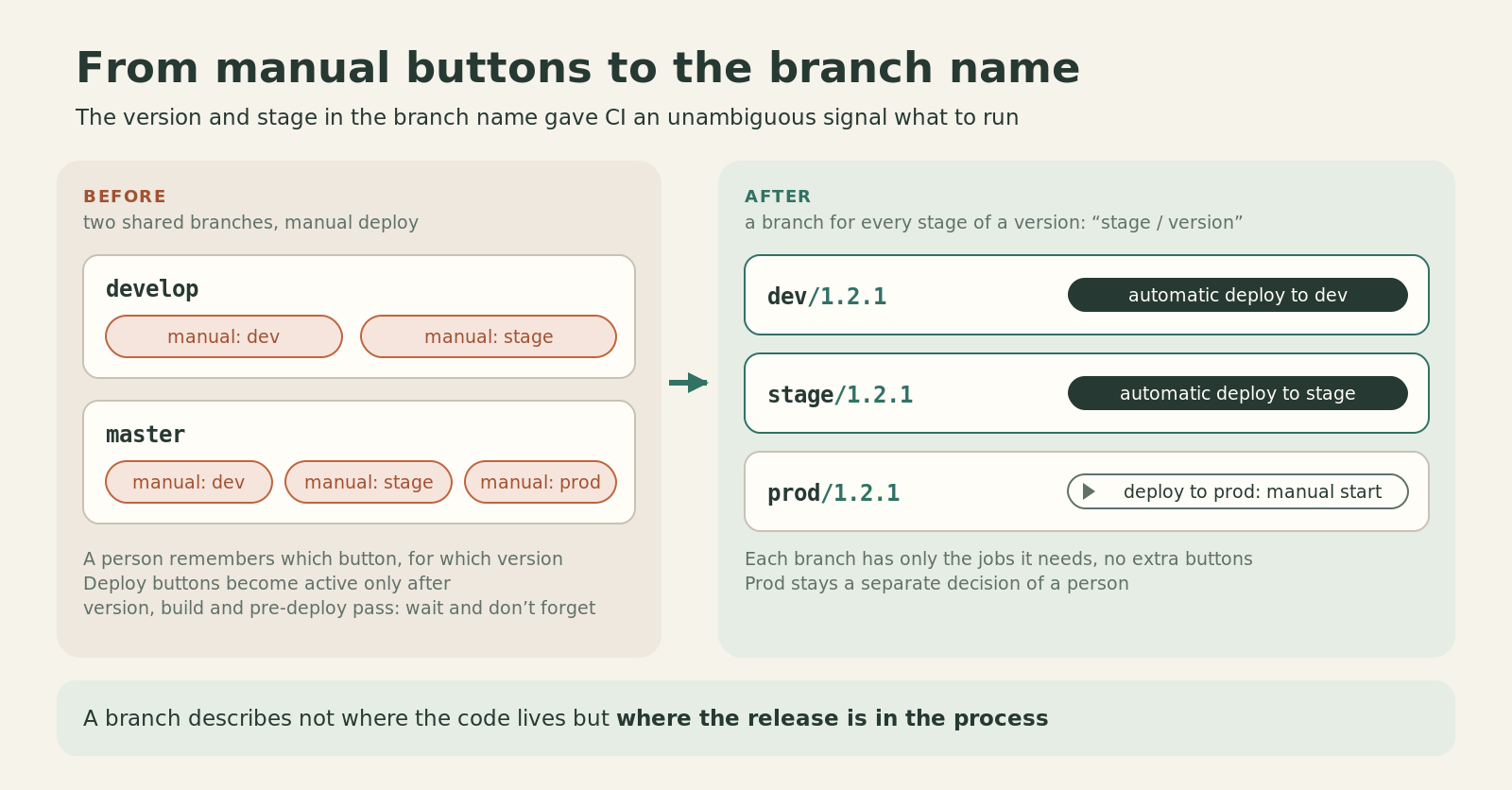
This is not a new technology. GitLab has long been able to run jobs by branch name. What matters more is something else: the branch now describes not just where the code lives, but where a specific release is in the process.
But this idea has a precondition. You cannot automate rules the team has not agreed on.
First we had to agree on the rules
I did not start with scripts.
First we described the components of the product, distributed tasks in Jira, and agreed on versioning, environments, branch names and the order of merge requests. That system had a server, an authorization server, a portal and an Android application. Components had their own versions: tasks were assigned in advance to planned releases.
It sounds like administrative preparation that you want to skip in order to open .gitlab-ci.yml right away. But this is exactly where the possibility of further automation is laid down.
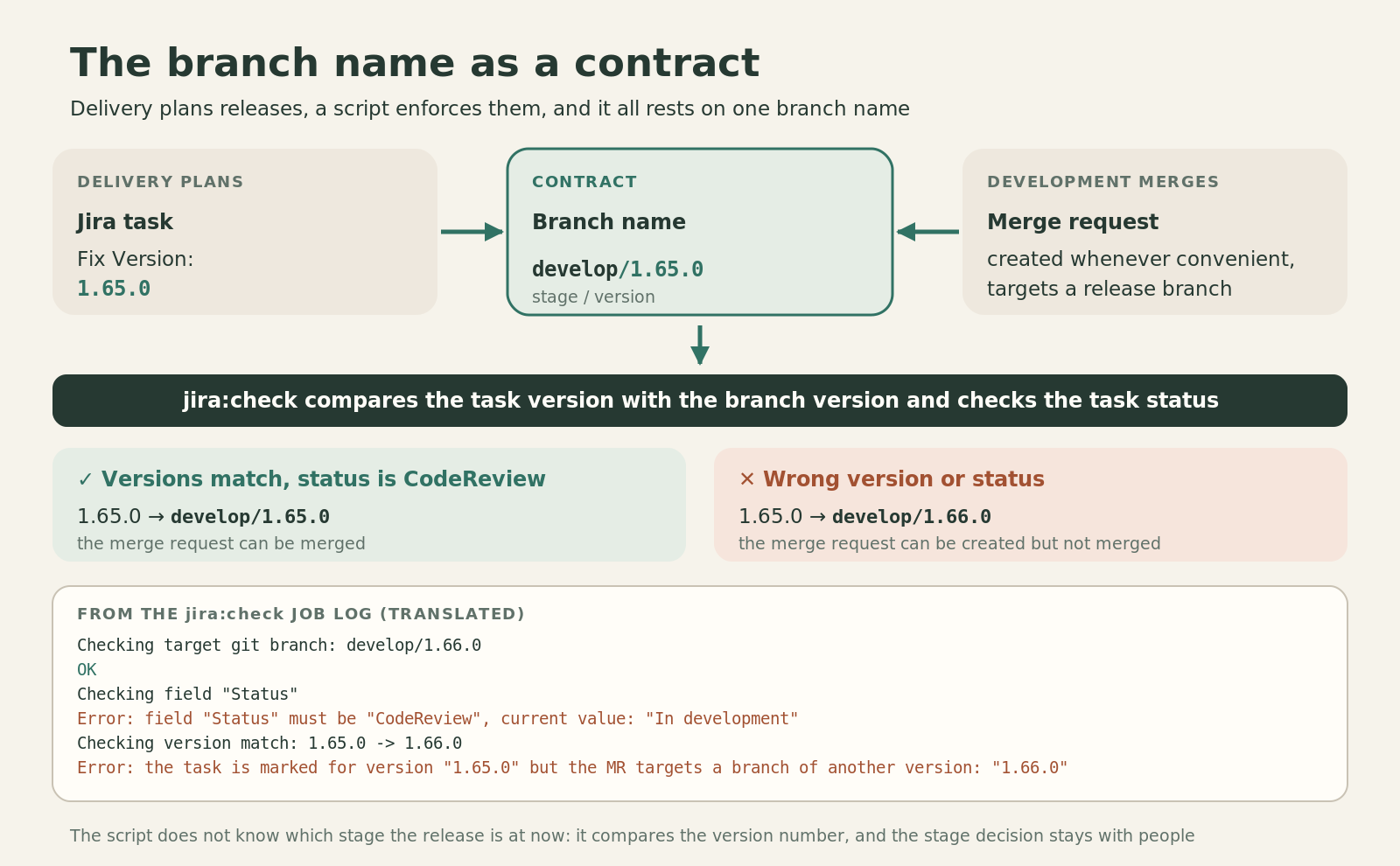
Take a simple task. If its Fix Version is 1.64.1, the developer understands which release the change is being prepared for. The target branch of the MR also contains 1.64.1, for example:
feature/ISSUE-123 → beta/1.64.1
Now the two values can be compared automatically: does the planned version of the task match the version of the target branch or not?
If the version is not set, matching cannot be checked. That is, planning stops being an optional note somewhere in a chat. It becomes input data for development.
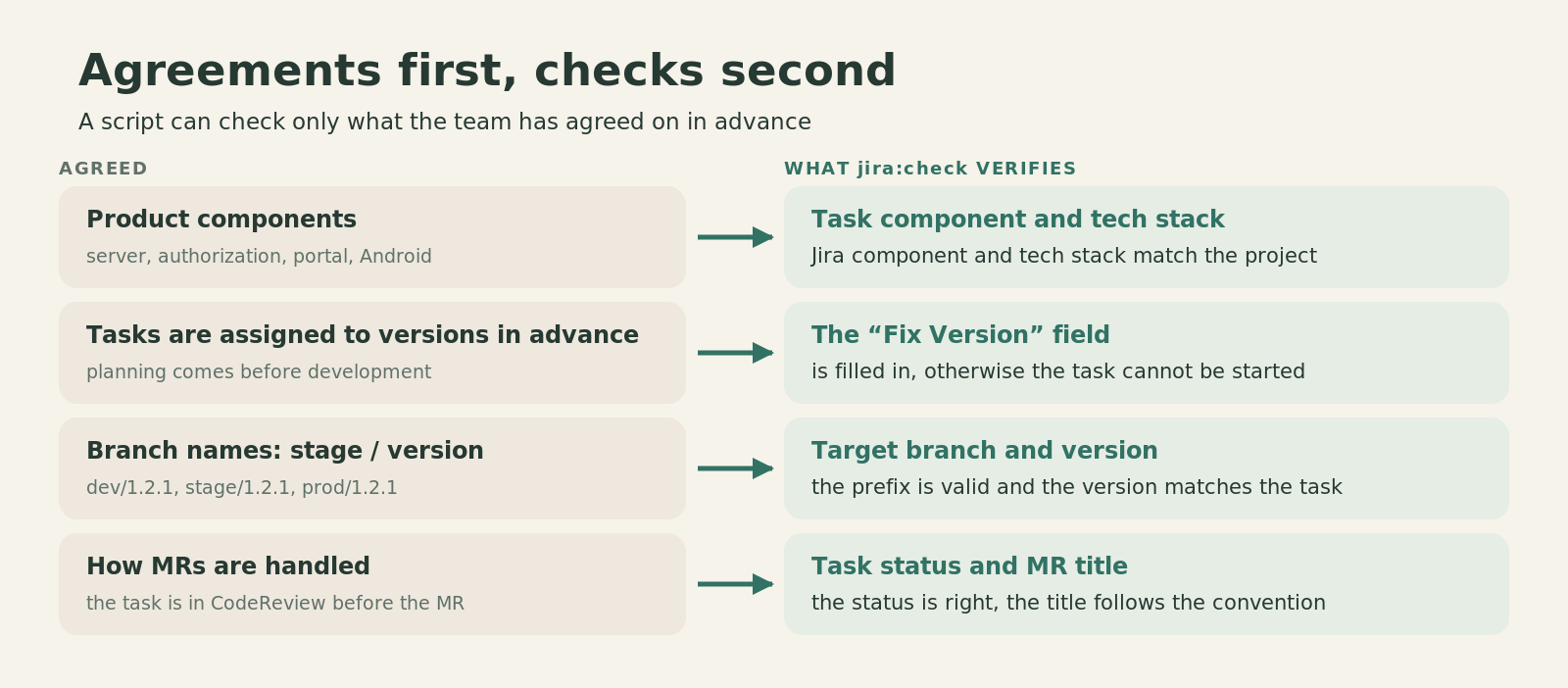
From such agreements you get a set of checks that run without a person.
Instead of reminders, a check on every MR
The process was agreed, but I constantly had to remind people how to write up tasks and merge requests. I left comments right in the review. Until they were fixed, the MR stayed blocked.
In the end I wrote jira:check, a Python script that runs in GitLab CI for a merge request.
It checks quite specific things:
- the Jira task key can be extracted from the name of a feature/bugfix branch;
- the target branch has a valid stage prefix;
- the task is in the required status and has the agreed fields filled in: tech stack, component and Fix Version;
- the version in Jira matches the version number of the target branch;
- the MR title follows the naming convention.
Errors are collected into a report. If the check fails, the job fails; with the “pipelines must succeed” requirement enabled, such an MR cannot be merged until the data is fixed.
I additionally protect the release branches themselves with GitLab Protected Branches.
The rules are set by masks: develop/*, alpha/*, beta/*, prod/*, depending on the project. So a new release, for example alpha/1.66.0, immediately falls under the right restrictions.
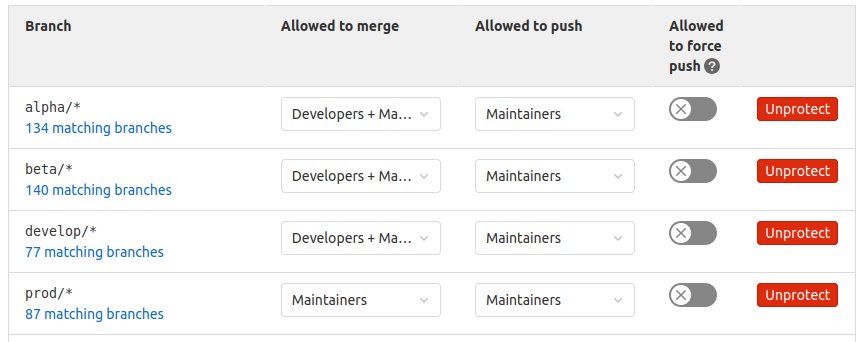
Merging into develop/*, alpha/* and beta/* through a merge request is open to developers and Maintainers; direct push is for Maintainers only. For prod/* both merge and push are left to Maintainers. Force push is disabled everywhere.
It continues the same thought. It is not enough to tell a newcomer: “Don’t touch the production branch.” If their role should not allow it, it is simpler and more reliable to fix the restriction in GitLab settings.
I have seen processes where a release was triggered by putting a tag on an arbitrary commit. In the projects I saw, access to such tags was not restricted properly. That is not a flaw of tags as a tool: GitLab can protect tags too. But in my process the release event is a merge into the protected branch of the right stage, and who may merge is determined by GitLab’s role model.
One agreement, different products and environments
At this point my Git Flow starts to pay off well beyond how MRs are formatted.
Since a branch is named <stage>/<version>, GitLab can determine from it what exactly to build and where to send the result.
In the Android project the branch selects the build variant, the API it works with, and the environment of the internal release service the APK is uploaded to. Nothing has to be chosen by hand: it all follows from the branch name.
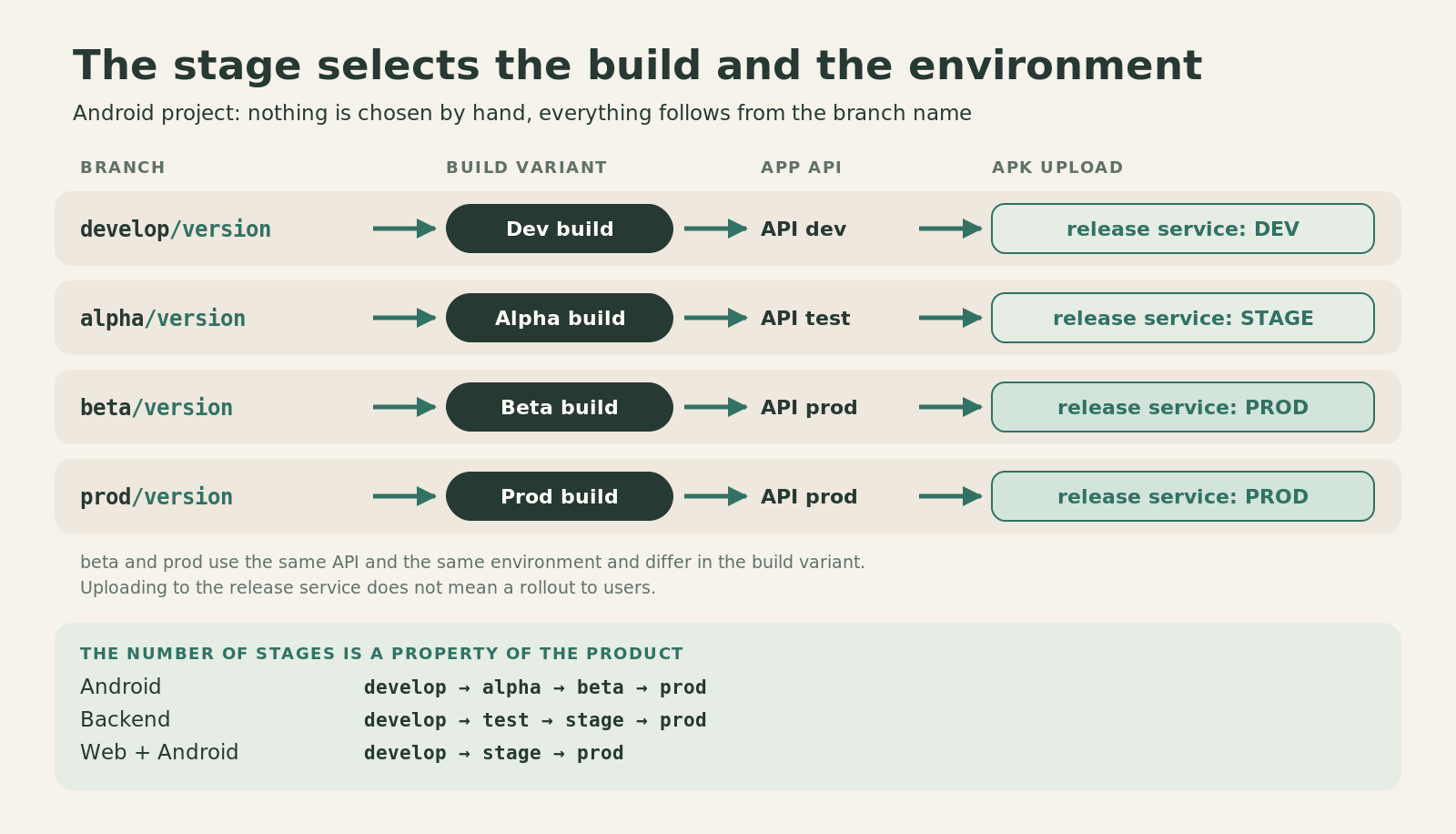
And it matters that the number of stages is a property of the product, not a universal law. In the backend project we have the chain develop → test → stage → prod. In another product, built for both web and Android, it is develop → stage → prod. In both cases the same base remains: the stage and the version in the branch name give CI/CD a clear event.
A stage determines more than the build variant. In my past projects it even determined the form of the distribution. When I first applied this approach, around 2013, in a Windows application, one branch produced binaries for internal testing, another an installer for the quality control department, and production a disc image with the program, documentation and extra materials for distribution. The build ran through TeamCity.
In another, later Android project the versioned branches sent the result either to internal storage or to a closed alpha channel in Google Play.
The tools and the delivery method changed. The idea stayed: a release stage determines which artifact is needed and who must receive it.
A merge triggers more than a build
Let’s return to a typical change. A developer made an MR, the Jira check passed, the review is done, and the code was merged into alpha/1.64.0.
What usually happens next where there is no process, or where it lives in documentation?
Someone has to build the right configuration. Someone has to publish the build. Then find the list of changes, tell the tester, give them a link, move the task to QA and not forget to assign it.
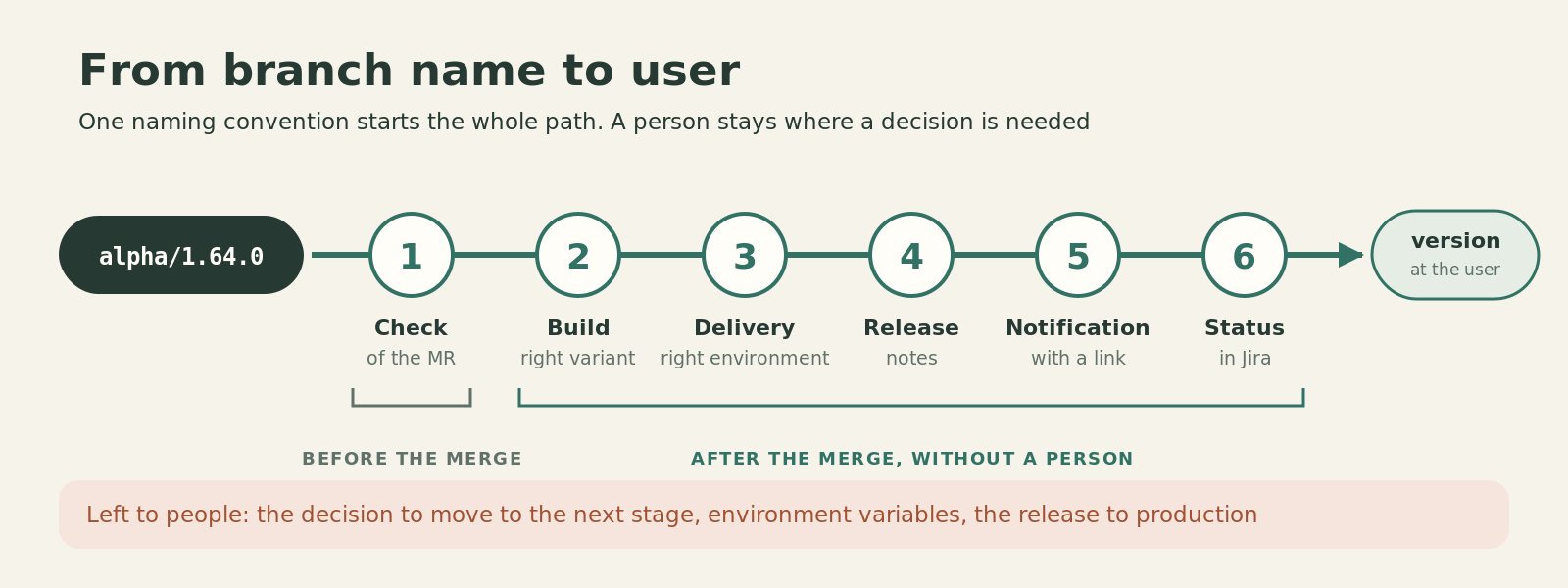
You can write a perfect instruction for these actions. Or you can bind them to a single event: a successful merge of an MR into a stage branch.
After such a merge CI performs the related operations:
- builds the right variant of the application or service;
- publishes the artifact to the corresponding environment;
- forms the list of tasks for the release notes;
- sends a notification with a link to the build and the list of changes;
- starts the Jira update: moves the task to “Ready for testing” and assigns QA.
For release notes I have a small script. It takes the changes brought in by the merge commit, extracts Jira keys from the commit messages and builds a list of tasks. It is not a universal analyzer of Git history: the result depends on the accepted commit format and on changes reaching the branch through a merge commit. But that is exactly why the naming convention is needed not for beauty: the automatic result depends on it.
Notifications used to arrive in Telegram, now it is Mattermost. The tester does not need to ask where to find the build: the message has a link and the list of tasks it contains.
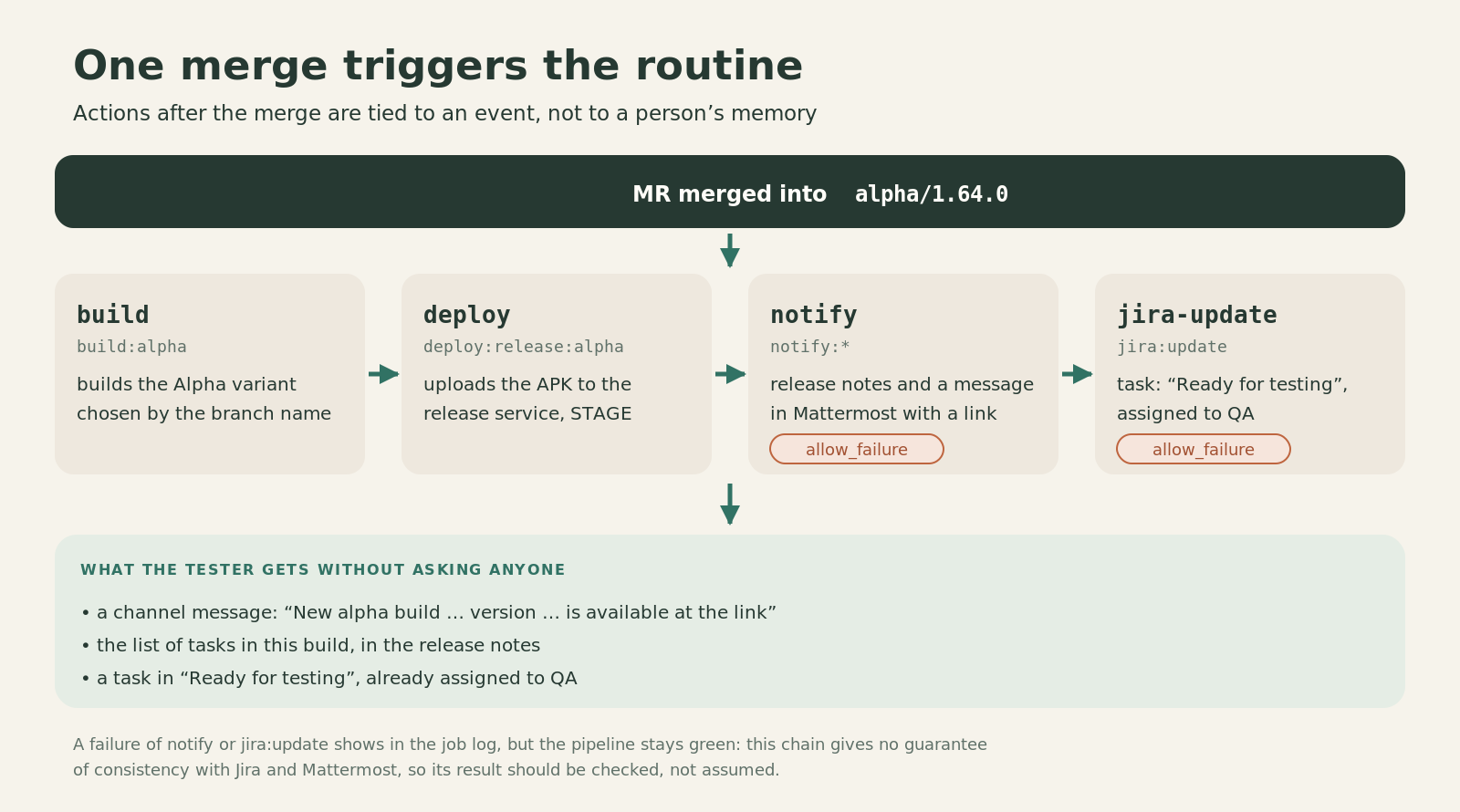
Jira automation is not magic either. In the current configuration jira:update and the notification are set up with allow_failure: if the Jira operation or sending the message fails, the pipeline may still finish successfully. This has to be watched in the logs and handled separately. I don’t want to pass off a set of scripts as a system in which every state is guaranteed to be consistent across all services.
But the main change did happen: a lot of mandatory routine actions no longer depend on whether a particular person remembered them after the merge.
The version must reach the user
There is one more routine story. Someone reports: “The screen doesn’t work for me” or “After the update the server responds wrongly.”
My first question is which version?
I want the answer without guessing from the deploy time and without searching for which artifact actually reached the user.
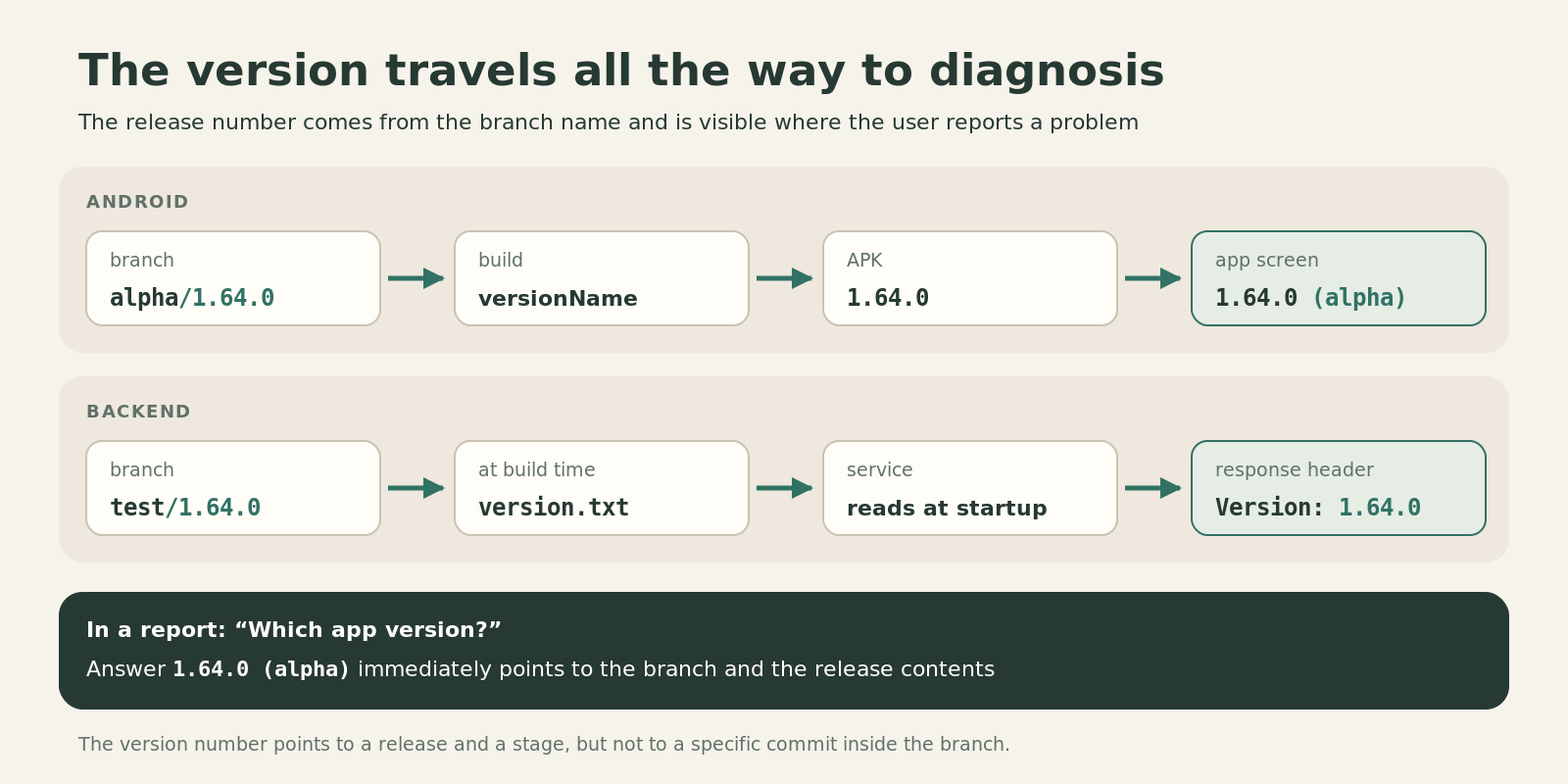
In the Android project versionName is built from the release number taken from the branch name: for alpha/1.64.0 the number will look like 1.64.0.
In the backend project the version is written to a resource at build time and returned to the client in the Version header.
So a report contains not a vague “the latest build” but a release number and a distinguishable configuration.
What I did not hand over to automation
You might get the impression that after such a CI/CD setup nobody manages the release any more: developers write code, GitLab decides everything, production updates itself.
That is not so, and it should not be.
People decide on moving between stages. In my process, releasing from develop to the first distribution stage is my responsibility as development lead. After internal testing, QA decides on the next step. Then delivery joins the decision about production, taking into account the beta test results and metrics. A promotion is formalized as a task and an MR. GitLab performs the permitted operation and its technical consequences.
And some checks CI still does not cover. It compares the version of the MR, but does not work out whether the release is currently at the right stage. It does not check the source branch of the feature. New secrets and parameters of the next environment still have to be prepared by a person: at a transition I pay attention to CI variables and Vault. Without that, even a successful deployment can end with a system that does not work.
Finally, no script will replace the manager who has to determine the contents of a release in advance. In the first part I explained exactly why without this the whole system loses its meaning.
I don’t want to be an overseer any more
Technically it was not hard: a few jobs and a couple of Python scripts. The harder part was this: having agreed on the rules three times, I still kept checking by hand whether they were followed.
The scripts did not teach everyone to understand the process in the same way. And they certainly did not make managers plan better. But they solved a different, quite practical problem: formal rules stopped depending on my constant personal checking.
A Jira task either meets the requirements or it does not. A version either matches the target branch or it does not. A role either allows merging or it does not. A merge either triggers the prescribed actions or we see in the pipeline which step did not run.
What is automated in the end: MR admission checks, build type and environment, artifact delivery, release notes, a notification with a link, task status and QA in Jira. Decisions about moving between stages, variables for the next environment and the release to production stay with people.
If a rule can be checked unambiguously by a machine, GitLab checks it, not the memory of a team member.