One layout wasn’t enough: how I taught a coding agent to assemble an Android screen without running the app
In my first article about the Android UI renderer I described how the project itself gave a coding agent a way to see the result of its Android XML changes. At the time, the problem looked almost solved.
The coding agent could take an XML layout, render it through Robolectric, and get a PNG and a View Tree with element coordinates. It was no longer editing XML blind: it saw the result and could check the geometry.
But as soon as I brought a real screen from a work app into the renderer, it turned out that a single layout was not enough.
A real screen is an Activity shell, a Fragment container, a RecyclerView with data, and states like a loading overlay. If you simply launch the production Fragment, it drags along DI, navigation, networking, and the rest of the app’s runtime.
What I needed was something else: give the agent a screen that is real enough for visual checks, without running the app itself.
That is how the next version of the renderer came about.
All images in this article are renders of an open demo app from the same repository (
sample/). The screen the renderer was developed on belongs to a work app, and I can’t show it. The demo reproduces the same structure — an Activity with a toolbar, a Fragment, a RecyclerView, master-detail, a loading overlay — and every image can be produced again from the request stored next to it.
Where a simple screenshot renderer ran out
The first version worked well with isolated XML layouts.
The pipeline looked roughly like this:
XML
  ↓
Robolectric
  ↓
inflate → fixture → measure → layout → draw
  ↓
PNG + View Tree
For individual cards, list rows, and simple screens, that is already enough.
But then I picked a real screen from a work Android project as a test case. I declared the project itself a read-only testing ground: the agent could study its resources and test the renderer on an isolated copy, but it was not allowed to change the app.
A new boundary showed up quickly.
The screen was not a single XML file. There was an Activity layout, a Fragment container inside it, and a RecyclerView inside the Fragment. For the list to look right, it needed rows with data and selected states. On top of that, I wanted to be able to show a loading overlay.
So the task changed.
I no longer needed a renderer for one layout. I needed a renderer for a composed screen.
A real UI without the real runtime
The obvious path is to bring up the Fragment the way the app does.
That is exactly what I didn’t want.
A production Fragment almost never exists on its own. Behind it there may be a ViewModel, a DI container, a navigation graph, repositories, the network, a database, and dozens of details that have nothing to do with the task “check what the screen looks like”.
If you pull all of that into the renderer, it quickly turns into yet another way to run the app — only much more complicated than a regular emulator.
So the boundary was drawn differently:
Activity XML          — real
Fragment XML          — real
item layout           — real
drawable              — real

Fragment runtime      — not run
DI                    — not run
navigation            — not run
network               — not run
data                  — set explicitly
This turned out to be the main architectural decision of the new version.
The renderer should use the app’s real UI resources, but get runtime state from a deterministic request.
Activity and Fragment as a composed target
For this, a separate render_target mode appeared.
Right now it supports one target, activity_fragment.
The renderer inflates the Activity XML, finds the required container in it, separately inflates the Fragment XML, and inserts it inside.
The production Fragment class is not started at all.
In simplified form:
activity_main.xml
        ↓
   container
        ↓
fragment_screen.xml
        ↓
   composed screen
In the request, this is four fields:
{
  "target": {
    "kind": "activity_fragment",
    "activityLayout": "activity_main",
    "containerId": "fragmentContainer",
    "fragmentLayout": "fragment_library"
  },
  "widthPx": 1920,
  "heightPx": 1200,
  "densityDpi": 240,
  "orientation": "landscape"
}
The result on the demo app — an Activity with a MaterialToolbar and a master-detail fragment inside a FragmentContainerView:
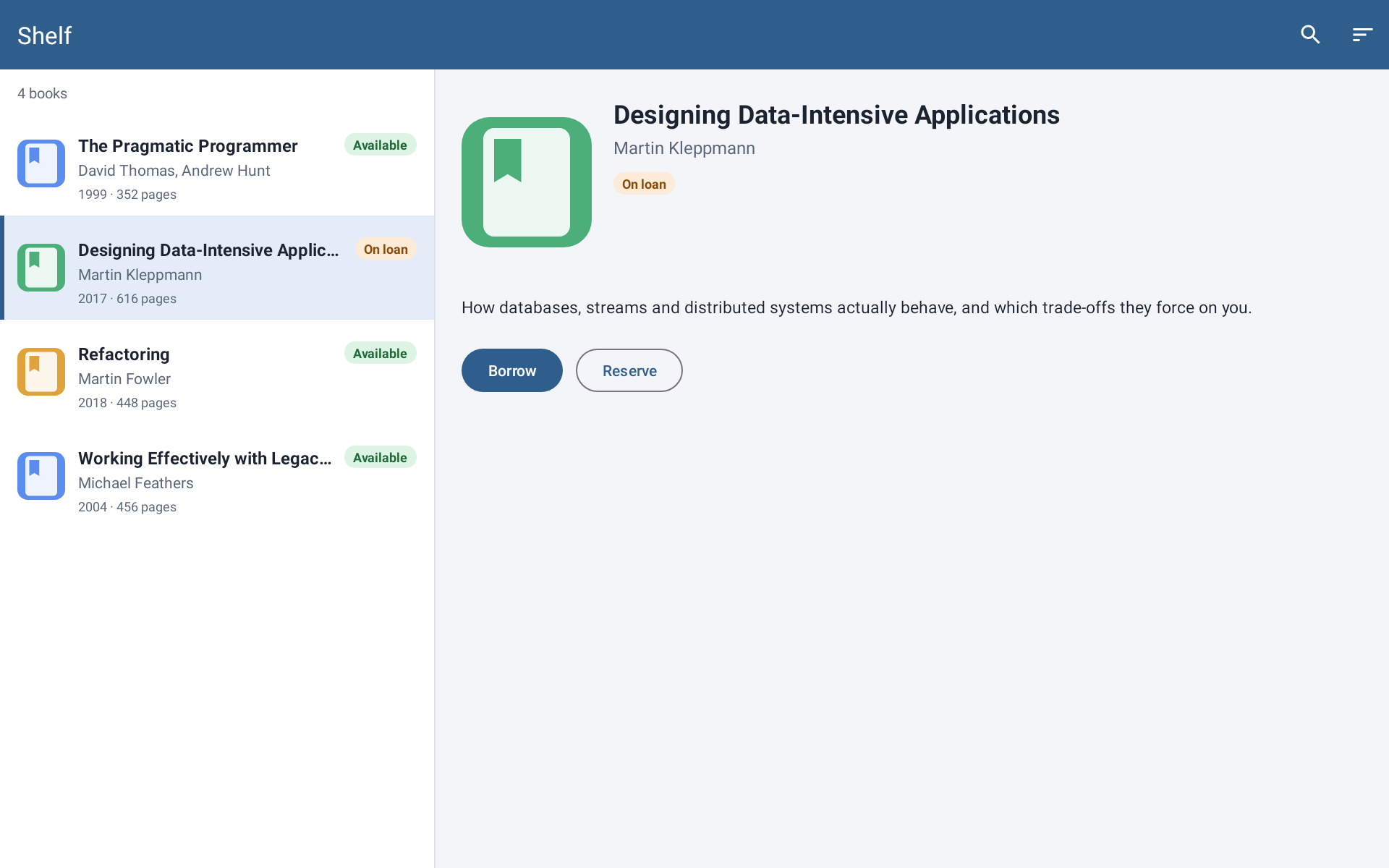
The toolbar title and menu icons come from XML (app:title, app:menu): no Activity code ran. On the right are the details via <include>; their values are also set in the request.
This is an important distinction.
I am not trying to emulate the lifecycle of a real Fragment. I need its visual result from the project’s real resources.
For a coding agent’s task, that is often enough: it changes XML and needs to understand what ended up on the screen.
The RecyclerView had to become deterministic too
The next problem appeared almost immediately.
Even if the Activity and Fragment are assembled correctly, an empty RecyclerView says very little about the real interface.
And again, I didn’t want to run the production adapter and fetch real data from the app.
So the list data became part of the render request.
For a RecyclerView, the request specifies:
- the app’s real
itemLayout; - the orientation;
- a set of rows;
- a fixture for each row.
The renderer creates a temporary adapter, inflates the real list item XML, and applies the supplied values.
For example, you can explicitly set text, visibility, or a selected-state drawable. One row from the request above — the selected book:
{
  "@id/title": { "text": "Designing Data-Intensive Applications" },
  "@id/cover": { "image": { "type": "drawable_resource", "value": "@drawable/cover_green" } },
  "@id/statusBadge": { "text": "On loan", "backgroundDrawable": "@drawable/bg_badge_on_loan", "textColor": "#8A4B08" },
  "@id/root": { "selected": true, "backgroundDrawable": "@drawable/bg_book_row_selected" }
}
The same item_book in a separate list fragment on a phone-sized canvas:
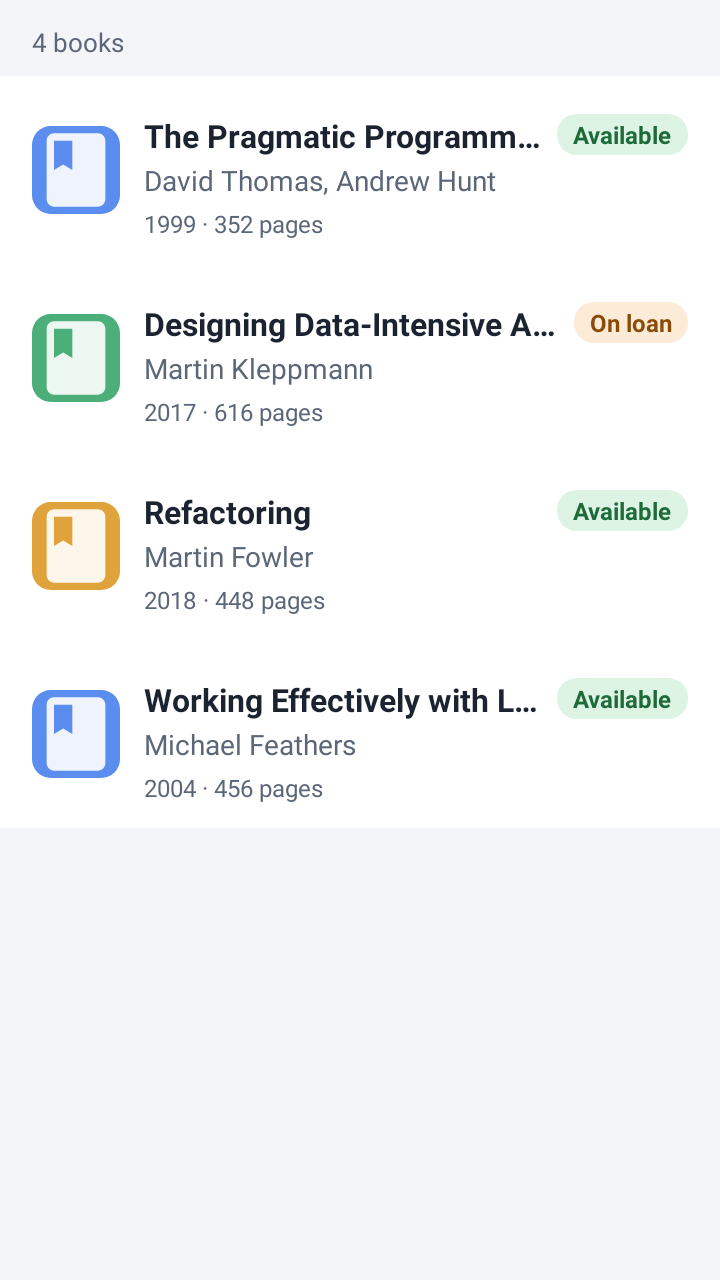
This gives an interesting boundary: the UI structure is real, the data is test data and fully controlled.
The renderer doesn’t guess anything and doesn’t try to extract business data from tools:*. If the agent wants to see three list rows, it has to describe those three rows in the request.
For reproducibility, this is far more useful than magic.
A mockup became the source of test data
During the work, I gave the agent a mockup of the target screen and asked it to use the mockup as the source of test data for the render.
So the agent’s task was not just “add RecyclerView support”.
It had to bring the render closer to a specific work screen while keeping the app itself read-only.
In parallel, I pinned down the profile of the real tablet.
The scenario under test used a landscape profile:
screen: 1280×800
app area: 1280×728
densityDpi: 240
fontScale: 1.0
locale: ru-RU
night mode: false
The bottom 72 pixels were taken by the system navigation bar.
For an ordinary screenshot this may look like a minor detail. For geometry checks it isn’t. If the agent compares element bounds, it has to work within the same available area as the real screen.
Then came overlays
Once the main screen started coming together, I moved on to transient states.
One of the scenarios is a loading overlay on top of Activity + Fragment.
Here the difference between “looks like the app” and “reproducible for the agent” showed up again.
A regular indeterminate ProgressBar is animated. If you take several screenshots in a row, its state can differ.
For a human, that’s not a problem.
For automated visual checks, it’s an unnecessary source of nondeterminism.
So before drawing, an indeterminate ProgressBar is frozen in a static state.
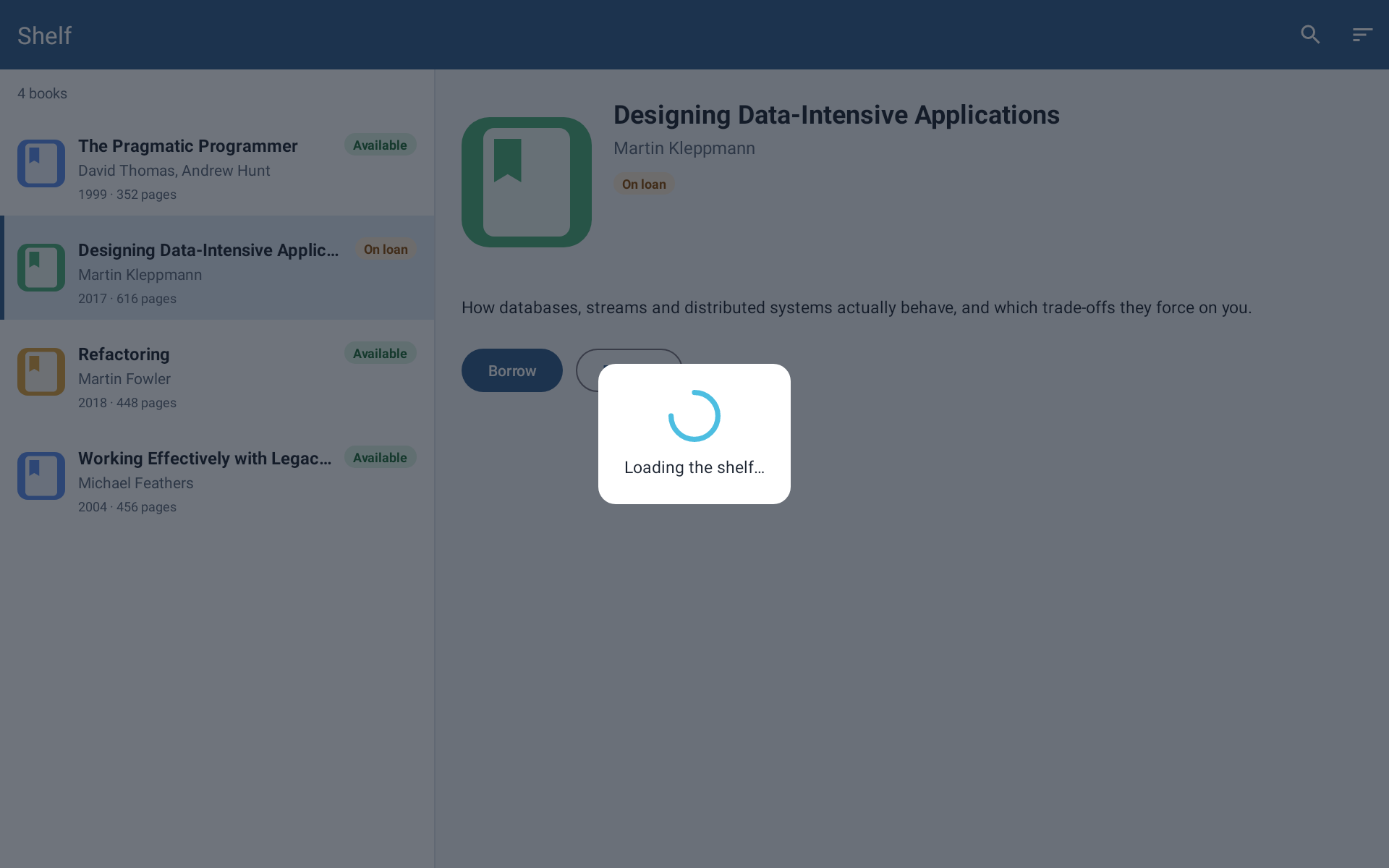
In the request, the overlay is just another XML layout with its own fixture: view_loading_overlay and @id/loadingRoot with visibility: visible.
The renderer doesn’t prove that the animation works correctly. It proves something else: the indicator is there, it’s in the right place, and it occupies the expected geometry.
That is exactly the degree of realism this task needs.
The moment I realized a screenshot still wasn’t enough
During one of the renders, I noticed another problem.
The result was saved: there was a PNG, there was a View Tree.
But the parameters that produced that result were not saved next to it.
So after a while you could open a nice picture and no longer know for sure:
- which MCP tool was called;
- with which arguments;
- which project root was used;
- which module and variant;
- which Gradle test task ran.
The result was a reproducible renderer with a non-reproducible run history.
This is especially interesting because I ended the previous article with exactly that conclusion: the next step should be structured run logs.
A few days later, real work forced me to build the first piece of such a log.
Now every sidecar run saves two additional files:
request.json
replay.json
request.json contains the normalized request.
replay.json is the run recipe: the MCP tool, arguments, project root, module, variant, and test task. For the screen with the overlay above it looks like this (arguments shortened):
{
  "format": "android-ui-renderer-mcp/replay/v1",
  "tool": "render_target",
  "arguments": {
    "target": { "kind": "activity_fragment", "activityLayout": "activity_main", "containerId": "fragmentContainer", "fragmentLayout": "fragment_library" },
    "widthPx": 1920, "heightPx": 1200, "densityDpi": 240, "orientation": "landscape",
    "overlays": [{ "layout": "view_loading_overlay", "fixture": { "@id/loadingRoot": { "visibility": "visible" } } }]
  },
  "project": { "root": "sample", "module": ":app", "variant": "debug", "testTask": ":app:testDebugUnitTest" }
}
As a result, a render session no longer looks like “here is a PNG that happened to come out once” but like a small engineering experiment that can be repeated on the same project revision and renderer version.
The open demo found what the work project didn’t
The demo app appeared later than the main work — as a replacement for images I can’t show. But it turned out to be useful for more than illustrations.
In the work project where the renderer was developed, JUnit was already among the test dependencies — as in any project created from the default Android Studio template.
The demo initially had no test dependencies, and the very first render failed:
error: package org.junit does not exist
The renderer runs its temporary probe as a JUnit 4 test and added only Robolectric to the project. It silently expected to find JUnit in the project itself. On the work project this never showed up, because JUnit was there.
The fix is small: JUnit 4.13.2 is added for the render run only if the project doesn’t declare it. A project with its own JUnit 4.12 stays on 4.12 — this was checked against the test classpath, not taken on faith.
The second finding concerned the demo itself: in the night theme, an outlined button turned out to be almost invisible, because the theme’s primary color matched the dark toolbar. It was the scenario with nightMode: true that revealed it, not reading the XML.
And one more observation. On repeated runs of all seven demo scenarios on the same machine, the PNGs matched the saved ones byte for byte. For experiments with replay.json this matters more than it seems: a replay produces not a “similar” image but the same one.
And a list row with a long title at fontScale: 1.3 shows why a View Tree is needed next to the PNG:

"textLayout": { "textSizePx": 40.0, "maxLines": 1, "lineCount": 1, "ellipsisCount": 81, "truncated": true }
The title’s bounds didn’t change, the image looks fine, but 81 characters were replaced by the ellipsis. By the way, 16sp at fontScale: 1.3 gives 40 px, not 41.6: since Android 14, large text scales non-linearly.
What the agent did in this work, and what I did
For this iteration I have a detailed worklog, so the division of roles can be reconstructed much more precisely than in the previous experiment.
I chose a real screen as the testing ground and immediately prohibited changes to the work app. Then I set the task of teaching the renderer to show RecyclerView, provided a mockup with test data, and pinned down the real tablet profile.
Later, I separately stopped the work before any changes around the overlay and dialog: first I asked for the problem to be studied without changing anything.
After the analysis, I clarified the desired render modes and chose a separate render_target rather than overloading the old render_layout.
Even later, I noticed that a render couldn’t be reproduced from the saved result directory alone, because the call arguments were lost. That is where request.json and replay.json came from.
The coding agent, for its part, studied the real screen’s XML and the limits of the current renderer, proposed a deterministic adapter for RecyclerView, implemented list and drawable-state support, then the composed Activity + Fragment target, overlays, and saving the replay recipe.
It ran its checks on an isolated copy of the work project without changing the project itself.
At the end, I manually checked the composed render with the loading overlay and only then gave the go-ahead to update the documentation and commit the changes.
The demo project went the same way: I defined the set of screens — a separate list item, a fragment with a list, master-detail, a whole Activity with a toolbar. The agent wrote the app, the render requests, and the JUnit dependency fix; the “add JUnit only if it’s missing” variant was also my refinement.
For me, this matters more than the line “the agent wrote 578 lines”.
The human didn’t type most of the code here. But it was the human who defined which boundary of reality the tool should model and what it should not do.
What came out of it
After this iteration, the renderer can assemble a composed Android screen from the project’s real resources:
Activity layout
    +
Fragment layout
    +
RecyclerView rows
    +
fixtures
    +
overlay
    ↓
PNG + View Tree + replay data
And it does so without running the production Fragment, DI, navigation, or network.
For the work project, end-to-end renders of the real screen are saved: composed Activity + Fragment, a variant with fixtures, and a variant with a loading overlay, with the View Tree next to them. Publicly, the same can be checked on the demo: for each of the seven scenarios the repository contains the request, the PNG, the View Tree, and replay.json.
The project’s tests pass, and the change itself is recorded as a separate commit.
But the limits of the result matter too.
Right now only one composed target kind is supported, activity_fragment: one container, one fragment layout. That is why master-detail in the demo is a single fragment layout rather than two fragments.
The RecyclerView only gets explicitly supplied local rows. Pagination, async loading, and a real data source are not modeled.
A static spinner lets you check the presence and geometry of the loading state, but says nothing about whether its animation is correct.
And it is still not a replacement for a device.
The most important result wasn’t the new API
At first I thought of this project as a way to give a coding agent a screenshot of Android UI.
Then it turned out that a screenshot without a View Tree isn’t checkable enough.
Now one more thing turned out: even a real View Tree of a single layout is not enough if the real screen is assembled from several levels and states.
Each next step comes down not so much to generating an image as to the question:
which part of the real app must stay real, and which part can be replaced with a deterministic model?
For the UI renderer, my current answer is this:
The interface’s resources and geometry must stay real.
The data and runtime state that are needed only for a reproducible render must be controlled and explicit.
And the experiment itself should leave behind not only a PNG, but enough information to repeat it.
This is exactly where a tool for a coding agent stops being just “eyes”.
It becomes an environment in which the result of the agent’s work can be not only seen, but reproduced.