I Gave a Coding Agent Eyes for Android UI — but an Image Was Not Enough
When a coding agent changes Android XML, it is fairly confident working with what it can read: it finds the layout, understands the constraints, and produces a diff. But there was almost always another manual step after that: I would open the screen and decide whether the button, text, or card had actually ended up in the right place.
I wanted to eliminate that repeated switch. I was not trying to hand over responsibility for the product or declare the emulator unnecessary. I wanted the result of the agent’s changes to be available within the same workflow in which it edited the code.
My first thought was a screenshot: the agent changes XML, gets an image, and looks at it. In practice, that turned out to be only half the solution.
One More Manual Step
The usual ways of checking Android UI are designed for a person. You can open Preview, launch an emulator, pick up a device, or run a screenshot test. In each case, my eyes are needed at the critical moment. The agent can accurately describe its diff, but that does not mean the layout actually came together as intended.
For XML/View screens, I wanted a shorter loop:
change XML → render → check the result → fix
I put rendering into a local MCP server built with Kotlin/JVM and Robolectric. The agent supplies a layout and explicit data for it, and gets the rendered result back.
MCP is not the main character here. It is simply a way to remove me from a repetitive intermediate step: launching the render manually and passing the result back to the agent myself.
The scope matters, too. This is a tool for XML/View projects, not a replacement for a device. It does not promise a pixel-for-pixel match with a physical phone, is not intended for Compose, and does not try to emulate hardware surfaces, video, or a camera.
I Gave the Agent a Screenshot
The PNG immediately made the result visible. The agent could see that something looked suspicious: text was clipped, a block had unexpectedly disappeared, or two elements were clearly overlapping. That was already better than changing XML blind.
At that point, it was tempting to consider the project almost finished. Screenshots were being generated, the MCP server responded, and inspect_view existed. On paper, the main pieces were in place.
But another review quickly shattered that impression.
The screenshot was real, but the sidecar returned an artificial root node as the View tree. You could not query that “tree” for a real child View, so a tool named inspect_view was barely useful.
That made it clear how much an image alone leaves unresolved.
It is poor at answering the questions that often determine whether a UI change is correct: what is the actual distance between two Views, has an element gone beyond the screen boundary, and where exactly is the View with a particular id? A person can estimate these things by eye. The agent needs verifiable data as well as an illustration.
At the same time, the coding agent pointed out another oversimplified idea: you cannot just start the Robolectric runtime once and keep reusing it indefinitely after changes to XML or Kotlin. You risk inspecting stale resources and an outdated classpath.
That observation changed the architecture and removed the temptation to treat a “warm JVM” as a problem we had already solved.
The Result Needs to Be Measured, Too
The turning point was simple to state but significant in its consequences: the PNG and the data must come from the very same layout, after layout has been performed.
After inflate → fixture → measure → layout → draw, the renderer saves the image and the real View tree. Each tree node includes its identifier, type, text and state, padding, margins, and absolute bounds.
The agent can therefore look at the screen first, then query a specific View and check its coordinates.
This loop involves three small operations: render_layout creates a render session, get_view_tree returns its tree, and inspect_view returns a single node by id.
What matters in this story is not the API names themselves, but the ability to move from:
“These look a little too close together”
to a measurable fact—for example, comparing the edge of a button with the edge of its container without estimating dimensions from a PNG.
That gave us a geometry feedback loop:
change → render → inspect → evidence → fix
The image helps reveal a problem, the tree provides the geometry, and the next change goes through the same render again.
Underneath, there is also a source fingerprint and an allowlisted Gradle pipeline. They prevent silently rendering stale state or passing arbitrary shell commands. Those mechanisms support the reliability of the loop; they are not the focus of the story.
The Real Test: An Actual Layout, Not a Toy Example
After all these changes, I connected the MCP server to an actual Android project I was working on.
The coding agent used it to fix a real product-card layout with a section for required items.

Before the fix: a product card with a required-items section in the problematic layout. The UI is in Russian.
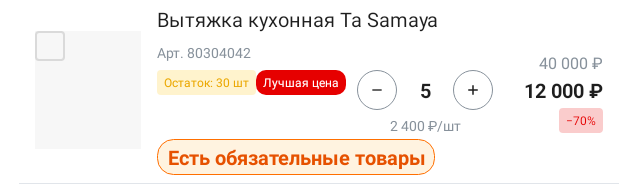
After the fix: the same card following a UI change made using the feedback loop. The UI is in Russian.
For me, that was the key acceptance test: the tool had moved beyond its RFC and its own unit tests into a real UI task. The feedback loop works on a real Android layout and was used by a coding agent in an actual UI change.
For the next experiment like this, I want to keep the complete record: the prompt, tool calls, render IDs, XML diff, measurements, and final verdict.
What the Experiment Actually Proved
| What I wanted to check | Result |
|---|---|
| Can a real Android XML/View layout be rendered through MCP + Robolectric? | Yes |
| Can a real, machine-readable View tree be returned alongside the PNG? | Yes |
| Did a coding agent use this loop in a real UI change? | Yes |
| Can the agent’s actions be fully reproduced from the saved data? | Not yet |
That does not mean I consider this a replacement for an emulator or a device. Robolectric does not guarantee a pixel-perfect match with hardware, I do not have a compatibility matrix covering all custom Views and complex themes, and the default sidecar is not yet the persistently warm JVM envisioned in the early architectural plan.
These are reasonable limitations for a first version. What matters more is that the tool’s limits can now be described in terms of facts, rather than the impression left by a good screenshot.
The Engineer’s Role Has Not Gone Away
In this story, I did not give the agent authority to “decide the UI.”
I defined a bounded problem, set the limits of support, refused to accept a PNG as sufficient evidence, and repeatedly brought the work back to verifiable criteria.
The coding agent, meanwhile, was more than a code generator. It helped implement the tool, identified the risk of a stale Robolectric runtime, and helped build and use the loop itself.
For me, the main result is not that a coding agent now has an image.
A screenshot makes the interface visible. A PNG together with a View tree makes it verifiable.
That is how manual visual review can leave the routine loop: not because I decided to simply trust the agent, but because it gets artifacts that can be measured and checked again.
Repository: android-ui-renderer-mcp on GitHub.