How I turned AI into a personal coach that finally has access to all my workouts
In October 2025 I decided to get back into running after a break of more than ten years. I used to run almost every day, then fell out of the habit for a long time, and decided to come back with a watch, tracks, and all the data I simply didn’t have before.
It very quickly turned out that the watch itself was only half the solution.
It dutifully recorded distance, heart rate, pace, cadence, training load, recovery, and other metrics. But the manufacturer’s app turned out to be a poor tool for exactly the thing I wanted most: not just to look at another run, but to understand whether I was recovering properly, whether I was ramping up load too fast, and what to do in the next session.
I wanted a personal coach, and decided to try ChatGPT.
After a run, I’d open the app, take a few screenshots, and upload them to the chat. On paper the scheme looked fine: the watch collects the data, I show it to AI, AI gives me an analysis.
In practice it fell apart quickly.
Screenshots weren’t enough
A single workout doesn’t fit on one screenshot. The summary is separate, the charts are separate, the heart rate zones are separate, other metrics are separate. The more detailed an analysis I wanted, the more raw data I had to gather by hand.
This approach worked especially badly with charts. A human can still visually connect several screens into one picture, but for the chat I was effectively rebuilding the context from fragments every single time.
But there was a more important problem: one workout means almost nothing without the previous ones.
A heart rate of 168 on its own is just a number. It’s a completely different story if it was 158 before that, then 164, 167, 168, 170, and 172 at roughly the same distance. Same with load, recovery, and distance. Useful advice needs a trend.
Through screenshots, I was bringing AI a small fragment of what the watch’s app already knew, every single time.
At some point it became clear: the problem wasn’t finding a better prompt. I needed a real channel between the watch’s data and AI.
I built a layer between Mi Fitness and AI
That’s how running-portal came about.
It syncs my running workouts from Mi Fitness, stores the history, and lets me load detailed data for a specific run. For a human it’s an ordinary training log. For AI, it’s a persistent source of context.
I didn’t research the private Mi Fitness API from scratch myself. I found an open-source project, Mi-Fitness-Sync by kevinkwee, published under the MIT License. It already had Xiaomi authorization, fetching workouts, and parsing detailed Mi Fitness data implemented. I used that implementation as the base for my portal’s sync module.
This is an important caveat: an AI agent wrote running-portal itself and integrated that code into it, but reverse-engineering the Mi Fitness protocol isn’t our work. Credit for that part goes to the author of Mi-Fitness-Sync.
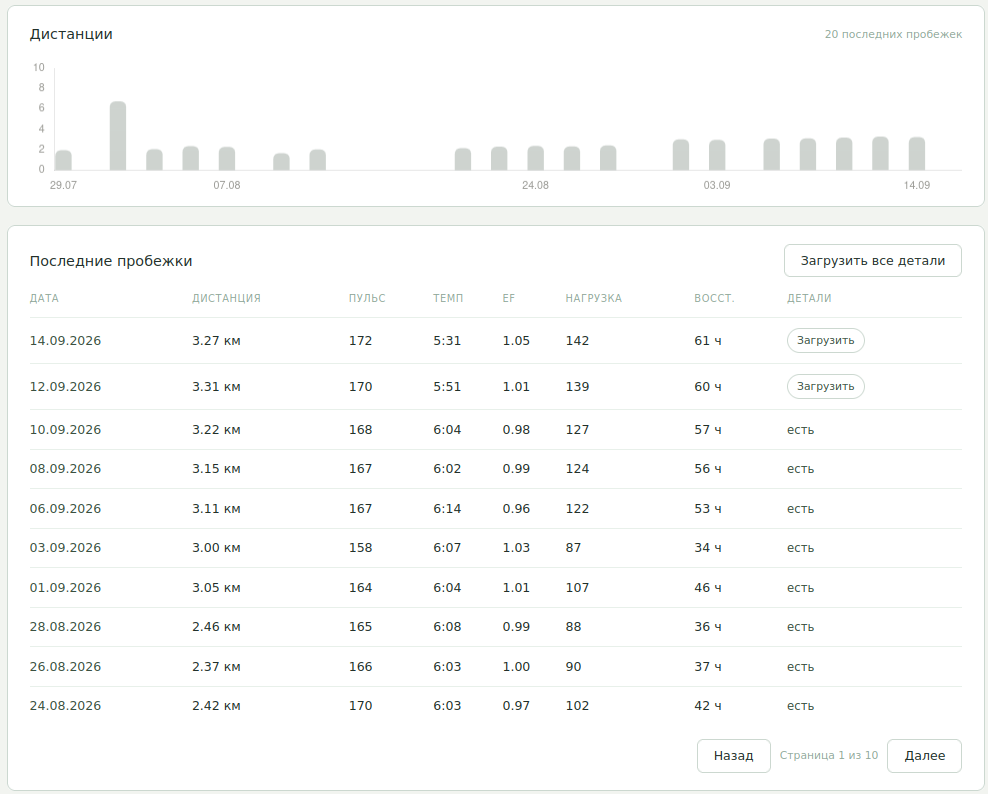
The training log. There’s no AI here yet — this is the data layer AI uses later.
There’s no AI on this screen. And that’s an important detail.
The portal just stores facts: date, distance, average heart rate, pace, Efficiency Factor, load, estimated recovery, and whether detailed data is available. It’s precisely this boring part that makes everything else possible.
Stripped down to its essence, the architecture looks like this:
Mi Fitness
    ↓
sync
    ↓
running-portal
    ├── run history
    ├── detailed metrics
    ├── charts
    ├── state / how I feel
    └── monthly goal
            ↓
        AI coach
Under the hood, the Mi Fitness integration turned out less than pleasant: it uses a private API and internal data formats, including separate files with detailed value series. That’s one of the reasons I think of the portal as a personal tool rather than the basis for a future public service.
But once the sync was working, the AI coach’s task changed radically.
It no longer needs to look at a picture.
A single run now arrives at the coach as data
The workout card shows me the same things that can then be passed to the model in structured form: heart rate, pace, cadence, stride length, load, recovery, heart rate zone distribution, and detailed time series.
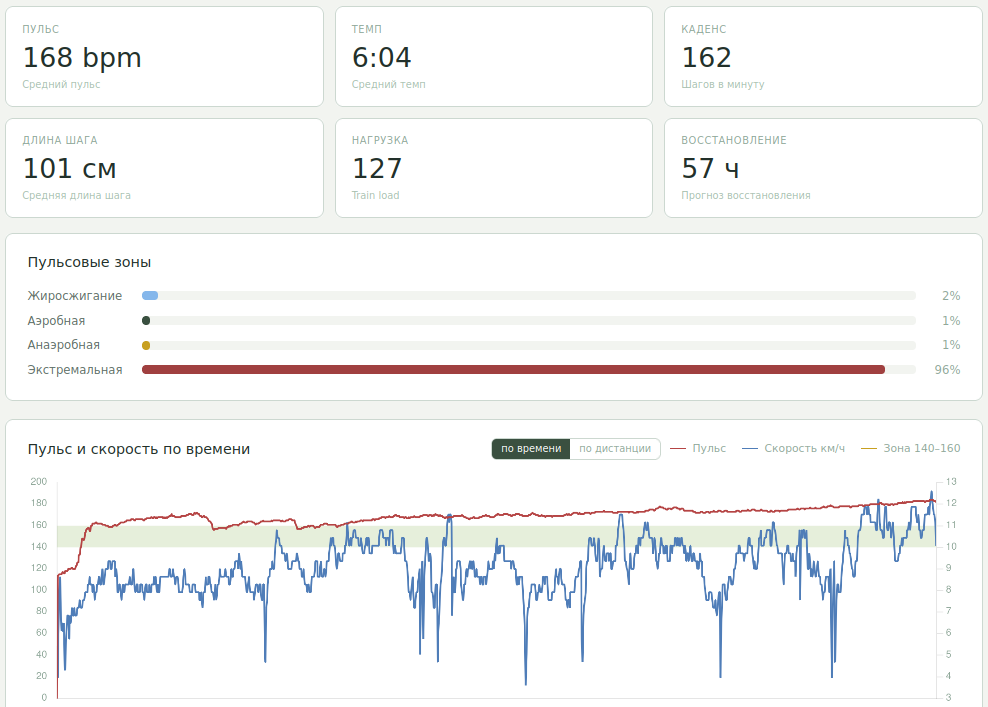
Detailed data for a single run. To me, it’s charts. To AI, it’s raw numbers.
That’s a fundamental difference from the original screenshots.
Before, I was showing AI a visual representation of the data. Now the portal itself gathers the facts and builds the context.
Here’s roughly what a shortened fragment of a real coach prompt looks like:
=== RUN ===
Distance: 3.216 km
Heart rate: 168 bpm
Pace: 6:04/km
Cadence: 162 spm
Load: 127
Recovery: 57 h
Heart rate zones: ... extreme 96%

=== RECENT RUNS ===
09/14: 3.271 km, HR 172, load 142
09/12: 3.307 km, HR 170, load 139
09/10: 3.216 km, HR 168, load 127
...

=== RESPONSE ===
1. Assessment of the run.
2. Risks given the current state.
3. One specific recommendation for the next workout.
The real request contains more data. It includes not just the current run, but also the history of recent workouts and stored context about my state.
I can edit the prompt template itself from the portal’s interface.
To me, this is an important separation of responsibility. The code gathers the facts. I set the rules and the format of the analysis. The model interprets the context and forms the response.
AI analysis is already the next layer
The result of the analysis shows up right on the workout card.
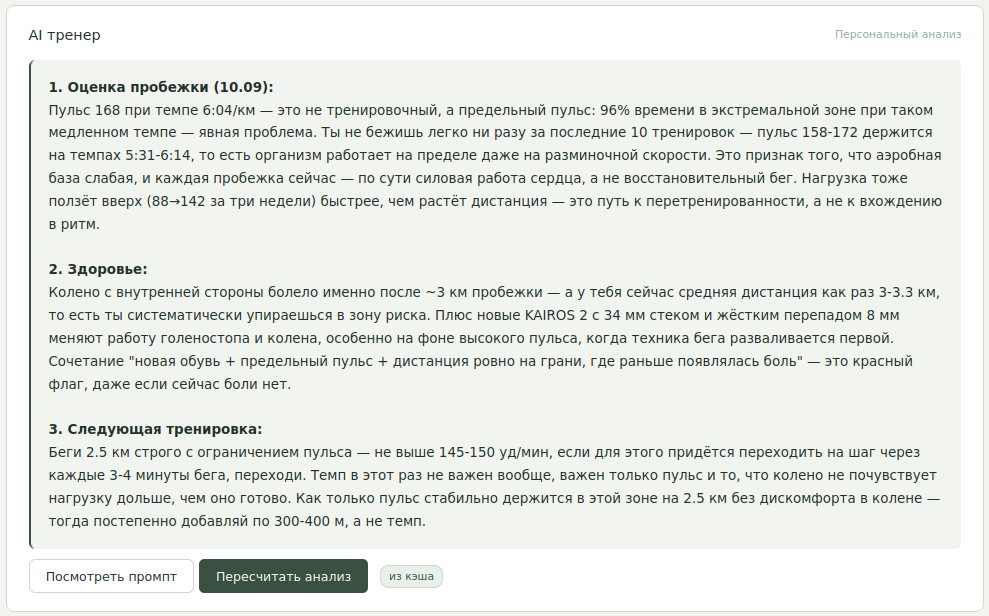
AI’s breakdown of the same workout: assessment → risks → a specific next session.
In the example in the screenshot, the coach pays attention not just to average heart rate, but to the fact that most of the run happened in a high heart rate zone, compares that to previous runs, and suggests not increasing the load.
What I wanted was exactly not another “good workout, keep it up” phrase, but a specific answer: what looks bad in this run and what to do next time.
I deliberately set a rigid response structure in the prompt. I don’t need a stream of sports motivation. I need three things: an assessment, the risks, and the next workout.
This is where I finally stopped thinking of the prompt as magic text that’s supposed to solve the task on its own.
The usefulness came primarily from the context.
There’s an even shorter question: can I run today?
Besides the detailed workout analysis, the portal has a daily recommendation.
It answers a simple practical question: run today, run easy, or rest?
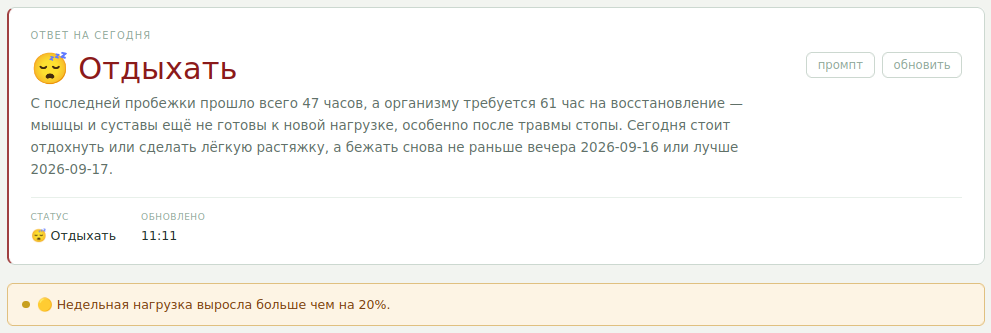
The daily recommendation. At the time of this screenshot, less than the estimated recovery time had passed since the last run, and the coach also factors in load history and context.
Here I don’t hand the decision fully over to the model.
The prompt has explicit rules. For example, if the estimated recovery time after the previous workout hasn’t passed yet, that’s one of the signals in favor of rest. High heart rate, load, and saved notes about my state are also factored in separately.
And the portal automatically fills in the facts:
last run
+ how much time has passed
+ last 7 runs
+ load
+ recovery
+ saved context
After that, the model formulates a short explanation.
I like this construction specifically: part of the guardrails is set explicitly, and the LLM is used exactly where several factors need to be connected and the recommendation explained in human language.
The coach turned out most useful exactly when I wanted to run more
During my return to regular training I had problems with my feet. Later my knee bothered me for a long time.
I don’t want to turn this into a medical success story. AI didn’t “cure” anything for me and didn’t replace a doctor.
But it turned out useful in a different role — as an extra check on my own tendency to increase load faster than I should.
When pain showed up in the context, the coach lowered the recommended load, suggested a pause, and advised seeing a doctor. After I bought new 361 KAIROS 2 shoes, that shoe change was also added to the context. For the coach, that became one more factor against sharply increasing volume.
Later a similar thing happened with my knee: instead of trying to hit some number no matter what, the portal kept the note about the problem in context, and AI kept factoring it into subsequent recommendations.
The pain is gone now, and I run consistently. But that period is exactly what showed me why long-term context matters at all.
A one-off chat easily forgets what happened two weeks ago. The portal doesn’t.
From the next workout to a monthly goal
When the main task was “get back into running and don’t force it,” recommendations after each workout were enough.
Then the task changed.
Now I’m more interested in figuring out what volume to set for the next month and how to move toward it without sharp jumps.
For that, at the start of the month AI analyzes previous runs and proposes three goal options: conservative, recommended, and ambitious.
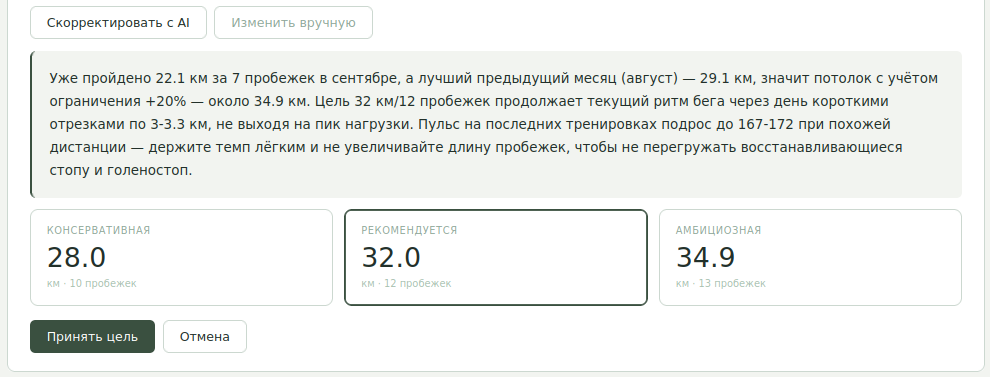
AI doesn’t set the goal itself. It proposes three scenarios and explains the recommended one; the final decision is mine.
I like that here too there’s no automatic “AI decided, human executes.”
The model proposes options. I choose.
Once the goal is accepted, AI is barely needed to track it: plain portal code counts kilometers run, number of workouts, remaining distance to the goal, and shows whether the month is on track.
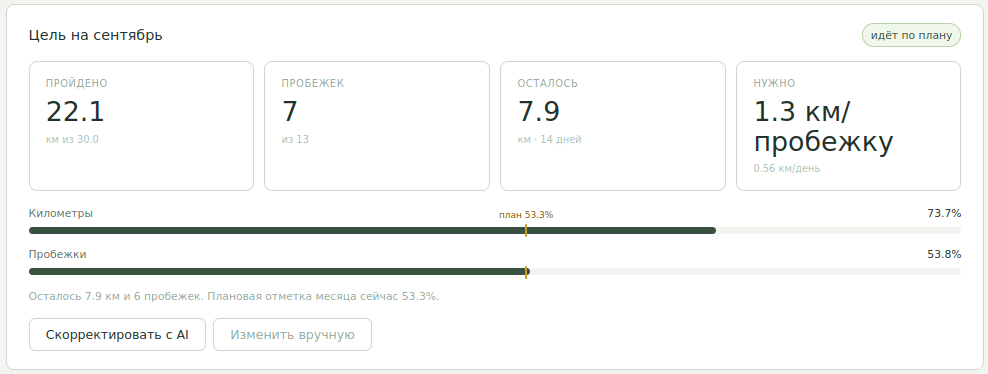
After the goal is chosen, the portal tracks progress on its own: kilometers, number of runs, remaining distance, and deviation from plan.
This illustrates well how I ended up using an LLM in this project.
Where plain arithmetic is enough, there should be arithmetic.
Where history needs to be interpreted and several reasonable scenarios proposed, that’s where AI shows up.
So who actually wrote the portal?
running-portal itself is 100% implemented by coding agents based on my specs. The exception is the low-level Mi Fitness integration: its foundation is the open-source Mi-Fitness-Sync project under the MIT License.
I deliberately don’t want to turn this article into a breakdown of how the agent wrote FastAPI, JavaScript, or SQL. To me, that’s secondary here.
But the process itself turned out to be interesting.
The portal wasn’t generated once with one big prompt and forgotten. I started using it, saw the next need, formulated it for the agent, checked the result, and kept using the new version.
The repository has kept 11 prompt artifacts from different stages. They show sync, frontend, the AI coach, charts, analytics, monthly goals, and other improvements appearing one after another. I can’t fully reconstruct every agent session behind them anymore, so I don’t want to pass off the number of files as a precise development log.
What matters more for this story is this:
use the portal
      ↓
see what's missing
      ↓
formulate the task for the coding agent
      ↓
get the change
      ↓
use the portal again
This is still ongoing.
The result is a fairly amusing closed loop: one AI helps me develop the tool, and another AI inside that tool works with my training data.
This isn’t a universal digital coach
The project has limitations, and I find them entirely acceptable.
It’s a personal portal for a single user. It depends on Mi Fitness’s private mechanisms, which could change. Under the hood it’s a simple FastAPI and SQLite architecture. Some of the background work runs directly inside the app process. This isn’t a product I’m ready to hand out to thousands of users right now.
And the AI coach isn’t a medical system either.
Even good context doesn’t turn the model’s answer into a medical fact. I treat the recommendations as one more source of feedback about training load, not as diagnosis or treatment.
That’s probably exactly why the personal format suits me best here. I understand where the data came from, I can see the prompt, I can change it, and I know the limitations of the whole chain.
Instead of a good prompt, I needed context infrastructure
When I started sending workout screenshots to ChatGPT, it seemed like the task boiled down to one thing: learning to ask the right way.
It turned out that a good question is the smallest part of the system.
The watch already knew how to collect data. The LLM already knew how to reason about it. What was missing between them was a layer that automatically stores the training history, surfaces the right details, adds up-to-date context, and hands all of that to the model in a predictable form.
For me, running-portal became exactly that layer.
I’m still running now, close to a year since coming back after a long break. Every workout lands in the portal. After a run I can get a detailed breakdown, before the next one a load recommendation, and at the start of the month a few goal options followed by tracking against them.
And the most interesting result for me here isn’t that AI managed to write yet another web app.
It’s that thanks to this app, AI stopped being a conversation partner I manually show a few pictures to after every run, and became a tool that actually sees the history of my running.
The source code for running-portal is open on GitHub. If this way of working with training data and AI resonates with you, give the project a star. And I’d especially welcome suggestions for improvement and bug reports: for a personal tool, that’s the most useful way to find out where it can get better.