I didn’t need another gas station tracker. I needed an answer: go fill up now or wait
At some point, a fuel shortage turned an ordinary household task into a small operational process.
There are a few gas stations near me worth driving to. I only need 95-octane. The mere fact that fuel showed up doesn’t tell me much: I could arrive and find a line of dozens of cars. The data goes stale fast, and I didn’t want to keep opening a website and checking manually.
So I built myself a small portal. But the interesting part wasn’t when the coding agent shipped the first working MVP — it was a bit later, when I looked at it and realized I had automated the wrong part of the problem.
I didn’t need monitoring.
I needed an answer:
Go now, or wait?
At 02:01 the portal wrote: “You can go”
One night a message arrived in Telegram:
🟢 You can go for 95-octane
The portal pointed to the right station and said there was no line.
I didn’t leave immediately. The decision is still mine: I could go out of my way, swing by on the way somewhere, or just skip the moment entirely.
About an hour later I decided to use it.
Home automation logged:
03:07— car left;03:30— car arrived.
So the whole trip took about 23 minutes.

The valuable part here isn’t that the recommendation happened to be useful. It’s that up to that moment I didn’t have to sit in front of a screen watching the situation.
The system did it on its own.
But the project didn’t get to that behavior right away.
The data already existed. The problem didn’t go away
Whenever a problem becomes widespread, services quickly appear that start collecting information around it.
The same thing happened with fuel: I could open a website and see reports about fuel availability, lines, and the state of specific stations.
That’s useful, but not enough for what I needed.
Every check still looked roughly like this:
- open the service;
- find the stations I care about;
- check specifically for 95-octane;
- look at the lines;
- figure out how fresh the data is;
- compare a few options;
- decide whether it’s worth going now.
And then repeat the whole thing a while later.
In other words, the data already existed. What was missing was a personal layer that knew my criteria and did the routine part of the work for me.
First MVP: a handful of curl calls, a problem description, and a ready-made template
I built the first version with a coding agent.
I don’t remember which agent it was exactly, and it doesn’t matter for this story.
I gave it:
- a description of the problem;
- about 5–6
curlexamples that made the available API clear; - a requirement to use my existing FastAPI project template.
From there the agent worked out the data structure on its own, wrote the project documentation, and implemented the MVP.
It already had:
- station search;
- adding stations of interest to a watchlist;
- periodic data collection;
- history;
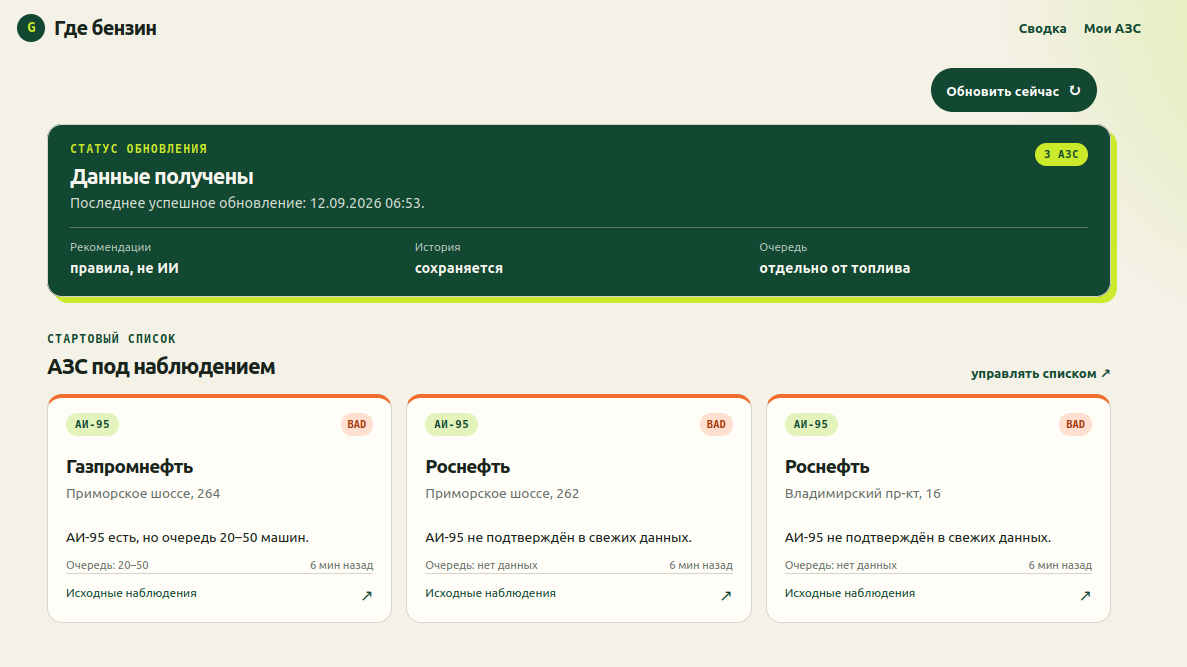
- a screen with the current state of the selected stations.
According to git history, the first commit with the plan landed on September 12 at 09:24, and the commit with the MVP at 11:44.
That doesn’t mean “2 hours 20 minutes of human work” — git doesn’t show how much time a person actually spent on the task or what happened inside the agent session. But it does show the pace at which a fairly raw input turned into a working product.
And this is where the most important turn in the project happened.
It worked. But it answered the wrong question
The first MVP was fine.
It collected data. It showed my stations. It gave a current snapshot. Technically, it did exactly what I had originally asked for.
But once I looked at the whole screen, it became obvious: I still had to look at several cards and interpret the situation myself.
I had automated getting the data.
I hadn’t automated the part that actually annoyed me.
The first version answered:
What’s happening at my gas stations right now?
But what I needed was an answer to:
Should I go for 95-octane now, or is it better to wait?
I brought the already-working screen to ChatGPT — not as a coding task, but as a product review.
That turned out to be a useful division of roles.
The first AI acted as the implementer: given the original spec, it quickly built a working system.
The second AI looked at the result from the outside and asked a different question: what decision should the user actually get on the main screen?
That review produced the idea of turning the monitor into a decision assistant.
A single status field isn’t enough
At first glance the task looks simple:
95-octane available -> go
95-octane not available -> don't go
On real data, this doesn’t work.
The source API has no formal public spec, and different parts of the response can describe the situation with different freshness and different semantics.
For example, the overall status might say fuel is available, while a more recent piece of data shows a line of 20–50 cars at the same time.
For what I needed, the phrase “95-octane is available” by itself decides nothing.
I had to account for at least:
- whether 95-octane specifically is confirmed;
- how fresh that confirmation is;
- what the line looks like;
- how fresh the line data is;
- whether the current state can be trusted at all.
I also had to nail down an important rule separately:
No fresh data does not mean no fuel.
If the system doesn’t know what’s happening, it should say UNKNOWN rather than pretend there’s no fuel.
Raw responses turned into station state
Between the external API and the decision, a separate normalization layer appeared.
Roughly:
API snapshot
    ↓
StationState
    ↓
StateTransition
    ↓
DecisionEngine
    ↓
GO / WAIT / NO_OPTIONS / UNKNOWN
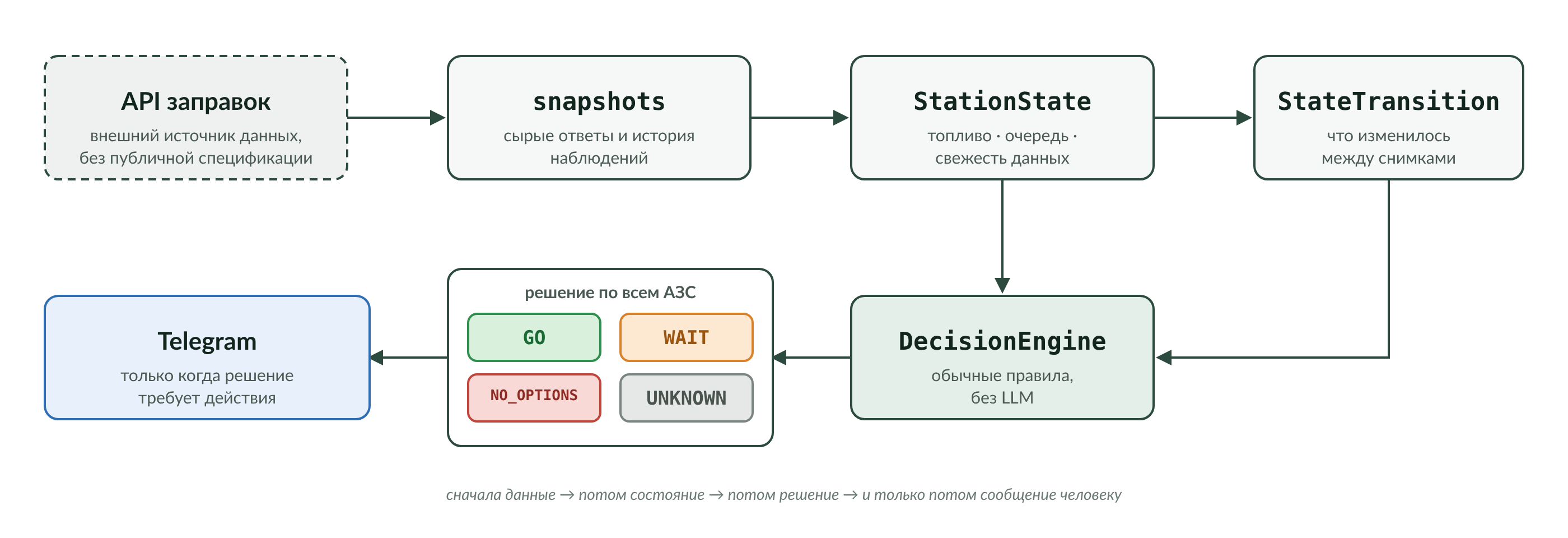
StationState already describes the situation in terms of my app: is the fuel I need available, what’s the line, when was the state observed, how fresh is the data.
And DecisionEngine looks at all my stations at once.
It has four possible outcomes:
GO— at least one suitable station has confirmed 95-octane and an acceptable line;WAIT— fuel is available, but the current options don’t work for me, e.g. because of the line;NO_OPTIONS— none of the watched stations currently has a confirmed suitable option;UNKNOWN— the fresh data isn’t enough for an honest decision.
This is deliberately a plain deterministic algorithm.
There’s no LLM at runtime.
Why the decision isn’t made by an LLM
At first glance, in a project built with AI, you want to use AI everywhere.
But the question “should I go now or wait?” turned out to be a bad fit for a generative model.
I needed the answer to:
- be repeatable;
- depend on specific, measurable conditions;
- be easy to diagnose;
- be explainable through the underlying facts;
- behave the same way after every restart.
So AI was used to build the system, analyze the interface, design and implement changes.
But the actual runtime decision is built on plain rules.
That turned out to be an important architectural split:
AI helps build the decision system, but the decision system itself doesn’t have to be an AI system.
The main screen stopped being a dashboard
After the redesign, the station cards didn’t disappear.
They’re still needed: sometimes I want to check details, compare stations, or just understand what data the recommendation is based on.
But now they became secondary.
The main element of the screen became the aggregate status across all watched stations.
For example:
GO
Followed immediately by an explanation:
95-octane confirmed: Gazpromneft, Primorskoe Highway 251 — no line.
Below that you can still look at the state of each station individually.
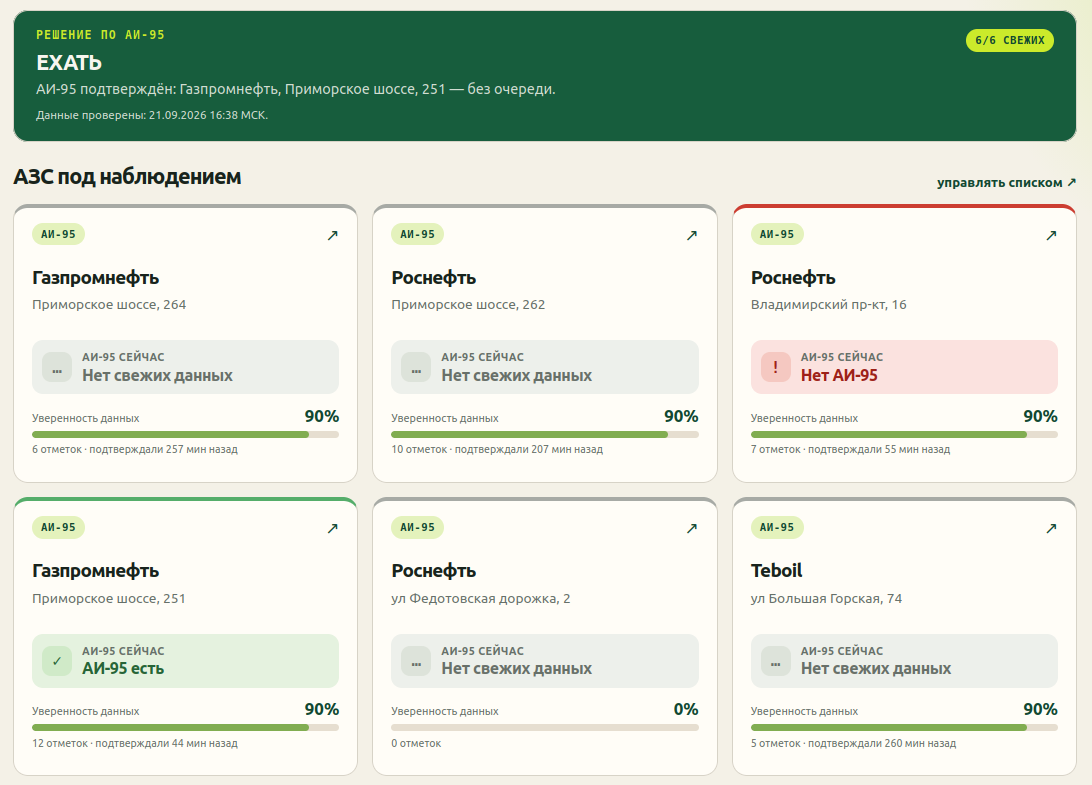
To me, that’s a fundamental difference in interface design.
The first version said:
Here are three cards. Figure it out.
The second one says:
You can go now. Here’s why. If you want, all the underlying data is below.
In other words, the interface flipped:
decision first → evidence after.
The history turned out useful for more than just the algorithm
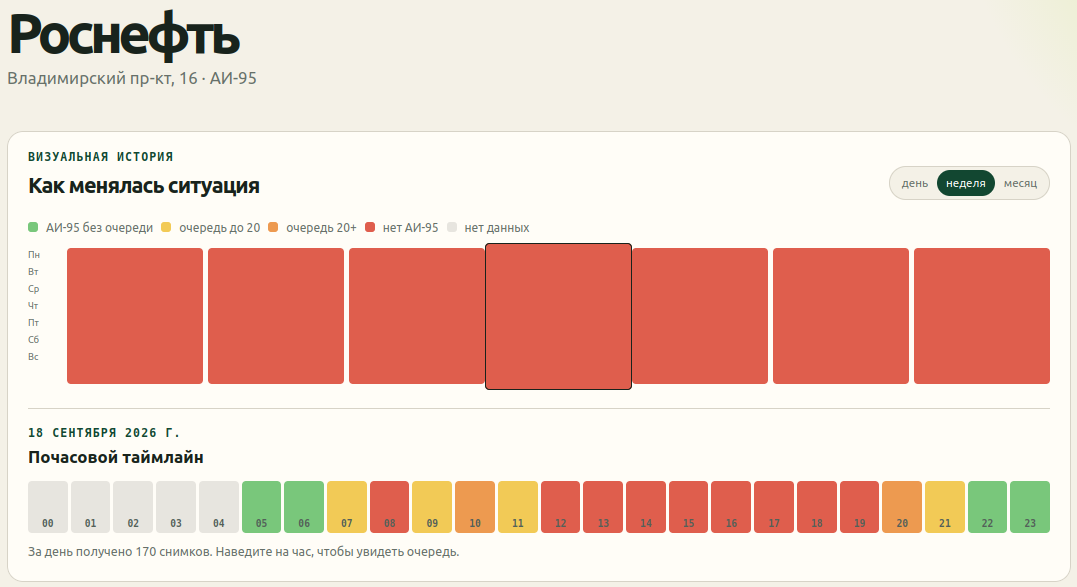
Every station has its own card with a history.
You can look at the situation by day, week, or month.
For a selected day, it builds an hour-by-hour timeline showing:
- 95-octane with no line;
- a short line;
- a long line;
- no 95-octane;
- no data.
It’s important not to credit the system with something it doesn’t actually do.
There’s no ML model in the project predicting when a fuel truck will arrive.
But the accumulated history already lets a human spot patterns themselves.
For example:
- what part of the day a specific station tends to get 95-octane;
- when a line usually starts forming;
- whether there are recurring time windows that are more convenient to go.
So the operational decision is delegated to the algorithm, while the deeper interpretation of history is still left to the human.
I like that division.
Not everything that can be automated needs to be immediately turned into a “smart forecast.”
The hardest part was teaching the system to stay quiet
Once DecisionEngine was in place, I first thought the main problem was solved.
But real-world use surfaced the next level of the problem.
The system started understanding transitions:
- fuel appeared;
- the line changed;
- data recovered;
- the overall verdict changed.
Technically, every such event is interesting.
To the user — it isn’t.
For example, a perfectly correct situation:
fuel appeared
↓
the line is still too long
↓
final verdict = WAIT
Why would I need a Telegram message about that?
If the recommendation is still “don’t go,” I just got another notification that demands attention and changes nothing about what I do.
So the next rule took shape:
I don’t care about every transition and intermediate status. I only want to know when I can actually go.
After that, Telegram stopped being a log of the system’s internal events.
It became a channel for actionable events only.
This was, arguably, the last important step in the project:
data
  ↓
decision
  ↓
is it worth interrupting the person right now?
That third step is what most distinguishes a personal assistant from an ordinary monitor.
But an event log is still needed — for the developer
At the same time, I kept detailed diagnostics inside the portal.
For every Telegram message sent, you can see:
- what the state was before;
- what changed;
- what event occurred;
- whether the overall verdict changed;
- why the portal decided to send a notification;
- the exact text that went out to Telegram.
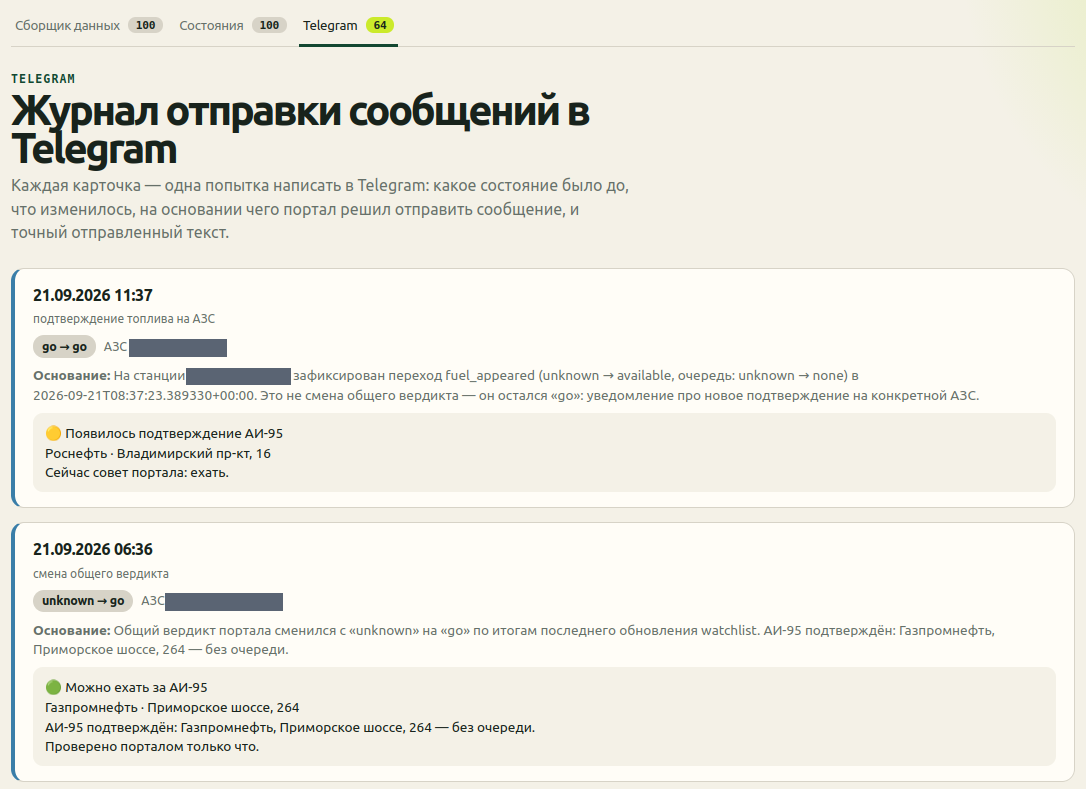
This isn’t a user-facing feature in the usual sense.
It’s an audit trail.
If the system tells me “go” at three in the morning, I want to be able to open the log afterward and see exactly which change made it decide to bother me.
For a rule-based decision system this is especially convenient: you can reconstruct the entire cause-and-effect chain.
What AI actually did, and what I did
The easiest way to ruin this story is to end it with “AI wrote me an app.”
Formally, AI really did a lot.
The coding agent got a handful of curl calls, a problem description, and a project template — and put together the first working service.
After that, AI was used to implement new state models, the decision engine, transitions, Telegram, history, audit, and tests.
But the most important changes didn’t come out of the code.
The first MVP was technically working. Only once I saw it in a real interface did I realize it answered the wrong question.
Then the already-working Telegram integration exposed the next problem: even a correct event system can be too chatty.
The result was roughly this cycle:
real problem
    ↓
task given to the agent
    ↓
working MVP
    ↓
human looks at the result
    ↓
realizes the wrong thing got automated
    ↓
external AI review
    ↓
new product model
    ↓
real-world use
    ↓
one more simplification
To me, that’s more interesting than the fact of code generation itself.
The developer’s role shifted.
I spent much less time hand-implementing specific classes, and much more time on questions like:
- what problem the system actually needs to solve;
- how to tell that the first version isn’t enough;
- what decision can be trusted to an algorithm;
- what data counts as sufficient;
- when the system has the right to interrupt a person;
- whether the result is actually useful in real life.
AI is good at writing code for a given task.
But a working product is sometimes exactly what’s needed for a person to realize: the task should have been framed differently.
Turning out to be one small step from a mass-market service to a personal assistant
I don’t think existing services are “bad.”
A mass-market product has a different job.
It has to show information to thousands of people with different routes, cars, preferences, and tolerance for lines.
It doesn’t have to know that, personally, I:
- only care about 95-octane;
- only care about a few specific stations;
- won’t accept a certain line length;
- don’t want to be notified about every change;
- only want to be called when there’s an actual practical reason to go.
But on top of a mass-market data source, you can add a thin personal layer:
someone else's data
+ my context
+ my rules
+ my history
+ my notifications
= a personal decision assistant
Previously, a service like this for a single person would have looked disproportionately expensive in terms of time.
With AI coding agents, the cost of that kind of experiment is completely different.
And that’s exactly where, for me, one of the most interesting uses of AI in development lies: not building yet another universal product, but quickly creating small systems that are too specific for the market, yet exactly match one particular person’s life.
The most useful service turned out to be the one that stays quiet most of the time
In the first version, I built a monitor.
In the second — a decision-making system.
And in real-world use, it turned out a third layer was needed: managing my attention.
At 02:01, the portal reported that a suitable option had appeared.
I hadn’t been watching a map all evening, hadn’t been refreshing a page, hadn’t been manually comparing several stations.
When it was convenient for me, I used the message.
At 03:07 the car left.
At 03:30 it came back.
And that, I think, is the best quality criterion for a project like this.
Not the number of screens. Not the number of API endpoints. Not whether the word AI appears in the architecture.
But the fact that most of the time the system doesn’t ask anything of me.
And it shows up exactly when there’s actually something for me to do.