The Feature I Wouldn’t Have Touched Myself: How a Coding Agent Added Jetpack Compose to Android UI Renderer MCP
I recently built Android UI Renderer MCP — a local MCP server that lets a coding agent render Android UI without an emulator or a device, get a PNG back, and then check element geometry against a component tree.
It originally worked with classic Android UI: XML/View, RecyclerView, Activity + Fragment, overlays, and different screen configurations.
Today I decided to check the obvious next question: what about Jetpack Compose?
By old standards, I’d have called support for a new UI technology a separate project milestone. By current ones, it turned out to be an ordinary task: I formulated it for the coding agent in the morning, and a couple of hours later main already had a new MCP tool, tests, a separate Compose demo project, and seven reproducible scenarios.
But for me the most interesting part here isn’t the speed.
If I’d had to build this support myself, I wouldn’t have taken it on at all.
Not because the task is unsolvable. I simply didn’t know how to even approach it, and the amount of upfront research could easily have outweighed the entire payoff of the feature.
And that, it seems, matters a lot more than yet another “AI wrote the code faster” story.
Why Compose couldn’t just be “added as another layout”
For XML, the renderer already had a clear path.
There’s a layout resource. You can load it, apply a fixture with test data, measure it, lay out the View hierarchy, draw it to a PNG, and serialize the tree.
Simplified:
XML layout
    ↓
inflate
    ↓
fixture with data
    ↓
measure / layout
    ↓
PNG + View tree
Compose has no such entry point.
There’s no XML file you can just inflate. There’s a Kotlin function:
@Composable
fun BookItem(
    book: Book,
    selected: Boolean,
    onClick: () -> Unit
)
To render it, knowing the function’s name isn’t enough. You need to understand its signature, build correct Kotlin values for its parameters, deal with enums, nullable types, data classes, collections, callbacks, theming — and only then call the composable inside an environment where Compose can actually draw.
And in a real app, a ViewModel, DI, navigation, and data loading quickly show up right next to it.
So the question initially didn’t look like “add support for one more UI format” — it looked like a fairly separate research problem.
And problems like that were exactly the kind I usually just never started.
Technically, almost anything can be done. But first you need to understand where to dig, which constraints are fundamental, what can be worked around, and what would require an architecture change. If the cost of that research exceeds the value of the feature, the feature stays on the “someday” list.
With a coding agent, that threshold turned out to be different.
I rejected the agent’s first proposal
The safest option was the obvious one: let every Compose project provide its own special renderer entry point.
In other words, the project would already know how to create the needed state, wire up dependencies, and call the composable, and the MCP would just run that prepared adapter.
It could have worked.
But for me, this killed the whole point of the tool.
I wasn’t building the renderer to be yet another test framework bolted onto an Android project. I needed a tool that an agent could attach to an existing project and use immediately, in a loop:
changed the UI
    ↓
rendered it
    ↓
looked at the PNG and the structure
    ↓
fixed it
If a developer first has to manually write a special adapter for every screen, the agent’s autonomy ends right where the real UI begins.
So I set a different constraint:
The MCP must adapt to Kotlin/Compose on its own. The project must not have to write a special renderer entry point.
This is where my work on this task clearly started to differ from what I was used to.
I didn’t know how to implement such a mechanism. I specified a property the result had to have.
From there, the research and implementation became the coding agent’s job.
What came out of it
The MCP got a separate tool, render_compose.
Instead of an XML layout, the agent passes the fully qualified name of a top-level composable and ordinary named JSON arguments:
{
  "function": "io.github.example.ComposeBookItem",
  "arguments": {
    "selected": true,
    "book": {
      "title": "Designing Data-Intensive Applications",
      "status": "AVAILABLE"
    }
  },
  "widthPx": 1280,
  "heightPx": 800,
  "densityDpi": 240
}
From there, the renderer:
- finds the Kotlin file with the target top-level
@Composable; - parses the function’s parameters;
- checks for extra and missing arguments;
- builds typed Kotlin values from the JSON;
- generates an ordinary Kotlin call to the composable;
- substitutes no-op lambdas for any missing callbacks;
- finds the project-level
AppThemeor uses an explicitly passed wrapper; - creates a temporary Kotlin probe;
- runs it via Gradle/Robolectric;
- draws the
ComposeViewto a PNG.
An important point: the Android project’s sources aren’t changed for this. The temporary probe lives in .android-ui-renderer.
It supports not just primitives, but also nullable values, enums, data classes, mutable properties, List, and Set.
In other words, the agent didn’t have to pre-build a special function like renderForMcp() inside every app.
| XML/View | Jetpack Compose |
|---|---|
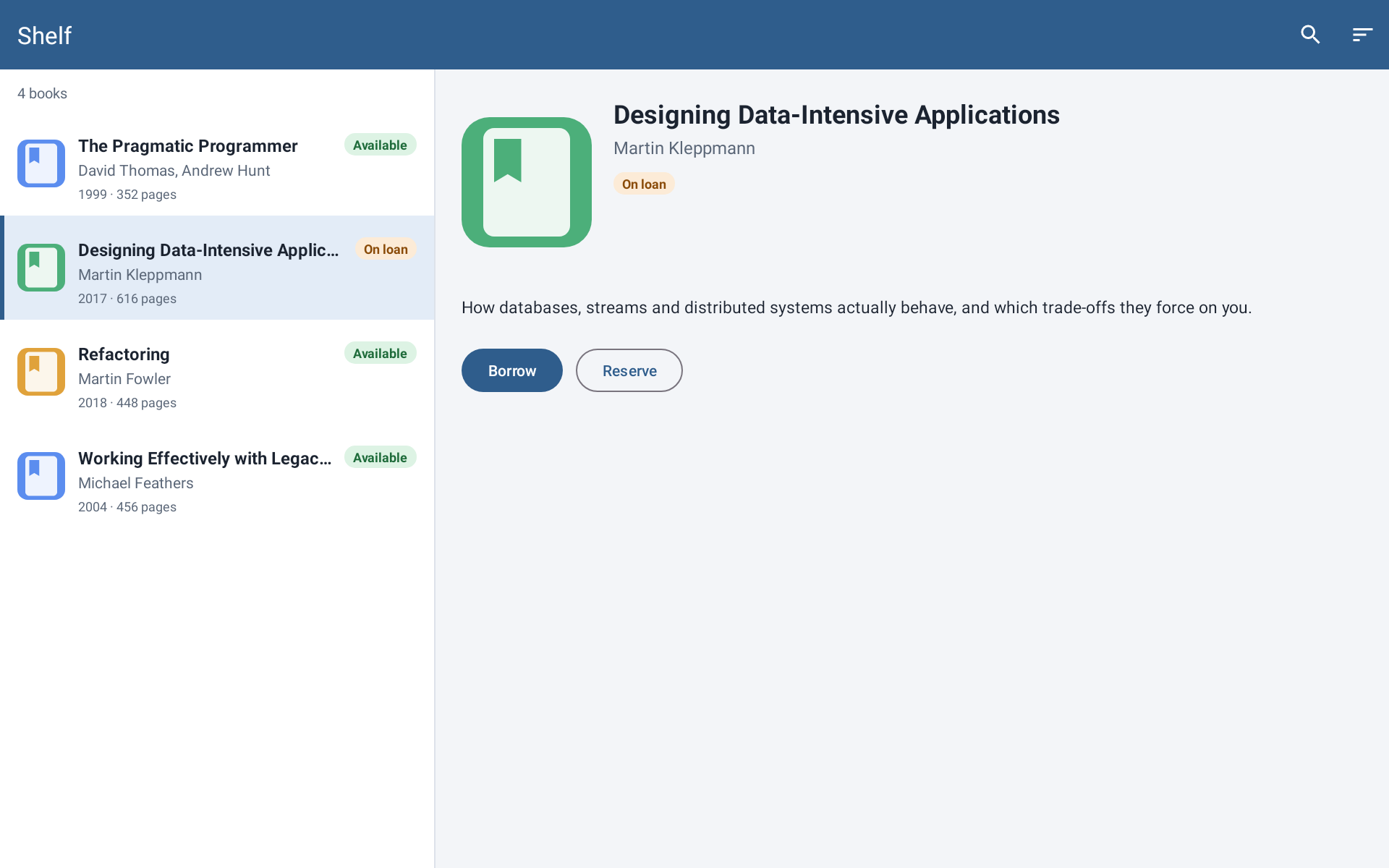 | 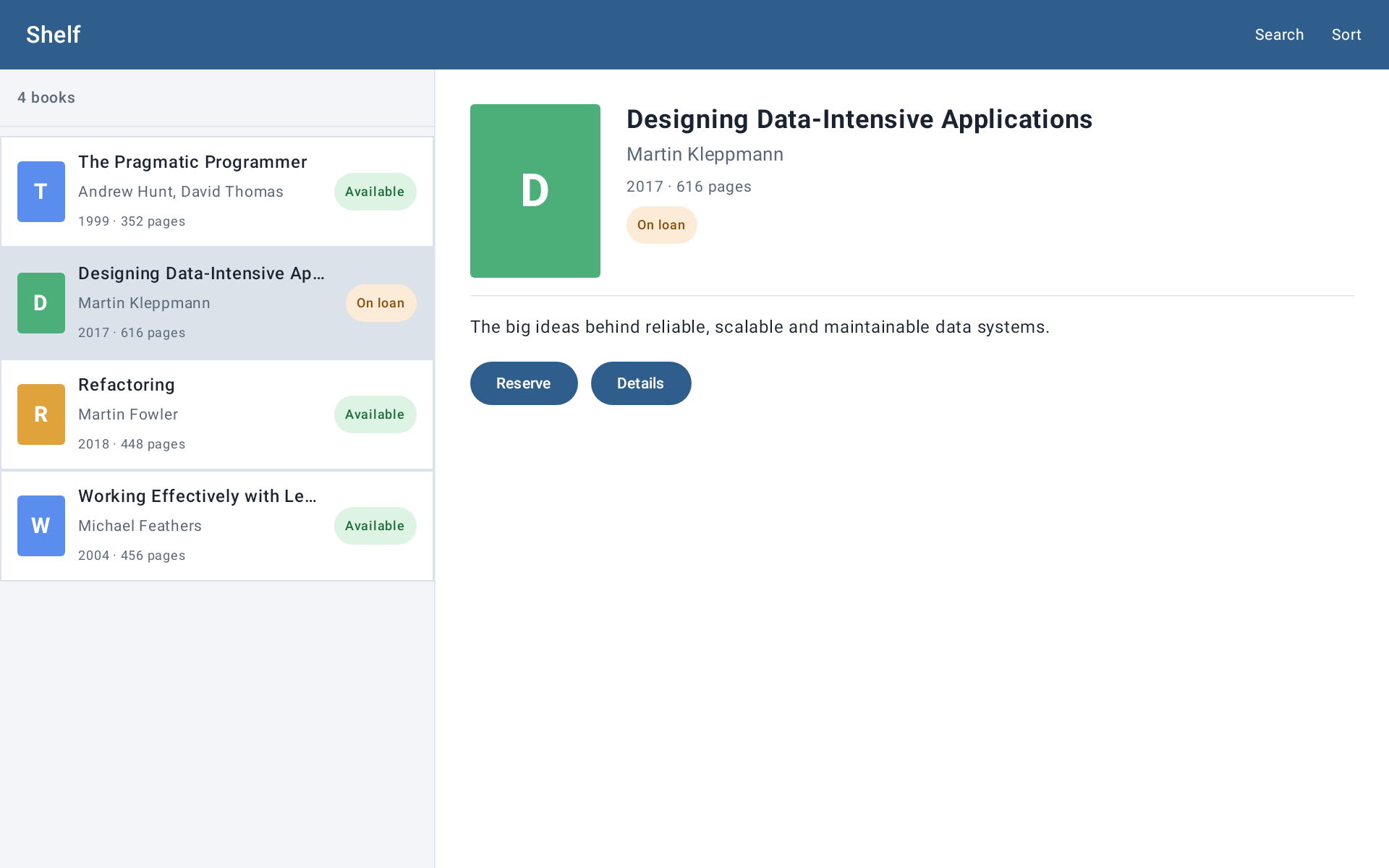 |
The same demo screen: XML/View on the left, Jetpack Compose on the right. Both renders were captured on a 1920×1200 px canvas at 240 dpi; the renderer gets a comparable result through two different mechanisms.
To verify this, I asked the agent not to build one artificial composable, but to make a full clone of an open-source Jetpack Compose sample project.
The repository now has two equivalent Android apps:
sample/— XML/View;sample-compose/— Jetpack Compose.
Both share the same small book library and the same seven scenarios: a book row, a long title with fontScale = 1.3, a list, master-detail, full screen, a loading state, and a Russian dark theme.
In the README, I specifically asked for the XML and Compose results to be placed side by side.
That’s far more convincing than the phrase “Compose is now supported.” You can just open the README and see: the same scenario runs through two fundamentally different UI stacks, and the renderer gets back an image plus a structured representation of the screen in both cases.
It’s important not to read these images as a pixel-perfect test between XML and Compose. The goal is different: to show that the renderer can reproduce equivalent states on the same canvas.
The first PNG showed up — and nothing worked yet
The most useful failure happened almost right away.
On a real Compose component, the agent got a normal PNG. Visually, the result was already there.
You could have called it done.
But the tree serialization then broke.
One of the Compose semantics nodes didn’t have a className, which the renderer’s existing protocol expected from every tree node. The image was there, but a full MCP response wasn’t.
For an ordinary screenshot tool, this might have been a minor issue.
For an agent tool, it’s a fundamental difference.
I don’t need the renderer so the agent can just “look” at a PNG with its eyes. After rendering, it needs to be able to ask:
where is this element?
what are its bounds?
what text does it have?
is it clickable?
selected?
checked?
what's inside it?
For XML, the View tree provides that information.
In Compose, the renderer now returns a semantics tree instead: bounds, text, contentDescription, enabled, clickable, selected, checked, and child nodes.
The agent fixed the incompatibility by adding a fallback for semantics nodes without a regular Android className, rebuilt the renderer, and reran the same real request.
After that, not just a screenshot passed, but the tool’s whole contract: image + structure.
For me, this is a good example of why “AI can draw a screen” and “AI got a tool for autonomous UI development” are not at all the same thing.
Here’s a fragment of the public view-tree.json from this demo. The node has not just text, but bounds and state the agent can act on next:
{
  "id": "semantics-33",
  "className": "androidx.compose.ui.semantics.SemanticsNode",
  "clickable": true,
  "bounds": { "left": 650, "top": 500, "right": 799, "bottom": 560 },
  "children": [{
    "id": "semantics-35",
    "text": "Reserve",
    "bounds": { "left": 686, "top": 515, "right": 763, "bottom": 545 }
  }]
}
Then the demo broke again — this time not because of Compose
The next failure was in a completely different place.
The renderer temporarily adds the test dependencies it needs via a Gradle init script. In the new Compose demo, this ran into a strict repositoriesMode: the project forbade adding a Robolectric dependency that way.
So the UI part itself already worked, but the reproducible open demo didn’t.
For sample-compose, the repositories mode was changed to PREFER_PROJECT, with a comment explaining why the renderer needs to be able to add a temporary test dependency.
This is also a characteristic part of agentic development.
When you say “add Compose support,” the real work doesn’t end at the Compose API. The agent has to go all the way to a reproducible result: Gradle, the test runtime, serialization, a demo project, artifacts.
Otherwise, what you get isn’t a tool — it’s a local experiment that happened to work once on the author’s machine.
From question to two commits — under two hours
Per the session log, the first note of the technical problem was at 12:26.
At 12:41, I rejected the mandatory project-side entry point.
Around 13:00, the first real Compose render already produced a PNG, but broke on the semantics tree.
Then came a second successful run, the Gradle policy issue in the open demo, tests, and the generation of all seven scenarios.
At 14:05, the main commit landed in main: Compose support, tests, and the Compose demo.
At 14:09 — a second one, after I pointed out that the two images had been captured at different sizes.
So, from stating the technical barrier to a fixed public result, about 1 hour 43 minutes passed.
I’m deliberately not turning this into a “a human would’ve needed N days, the agent took two hours” comparison.
I don’t know how many days this implementation would have taken me.
Because my honest answer is simpler: I probably would never have started it at all.
I would have had to first separately learn how to call an arbitrary composable programmatically, what happens with Compose compiler transformations, how to build the parameters, how to get a semantics tree, how to get all of that running on Robolectric, and how to avoid turning the project into a pile of special test entry points.
Sure, all of that can be researched.
But the cost of that research is exactly what would have been the main stop factor.
A coding agent changed not so much the speed of writing code, but the economics of deciding whether an idea is even worth trying.
What the agent ended up doing, and what I did
Looking only at the git diff, it might seem my role nearly disappeared.
The agent really did do the main technical work:
- designed and implemented
render_compose; - built the typed Kotlin call generator;
- built the Compose probe and semantics tree;
- added unit tests for enums, data classes, mutable state, and callbacks;
- verified the renderer on a real Compose component;
- created a separate, open
sample-compose; - built seven reproducible scenarios;
- fixed the problems it found along the way.
I didn’t write this code by hand.
But my own work shifted somewhere else.
I decided what solution I didn’t want: no mandatory project-side adapter.
I defined the property the system had to have: an existing Android project stays an ordinary project, and adapting JSON into Kotlin/Compose is the MCP’s job.
I authorized verification on a real, working component, not just a toy demo.
And I caught an error in the visual comparison criteria, when two formally working XML/Compose renders turned out to have been captured on different canvases.
That’s an interesting shift in roles.
Previously, the chain would have looked roughly like this for me:
study an unfamiliar technology area
    ↓
find an architectural approach
    ↓
implement
    ↓
debug
    ↓
write tests
    ↓
build a demo
    ↓
verify the result
Now, a significant chunk of the middle of that chain can go to the agent:
state the required system property
    ↓
set architectural constraints
    ↓
agent: research → implementation → tests → demo → fixes
    ↓
verify this is actually the result I need
This doesn’t mean the technical complexity went away.
It’s still there, in the code.
It just means I no longer have to walk the entire research path myself before I even get to decide whether the idea is worth it.
This isn’t “any Compose project” yet
It’s important not to overstate the result here.
The current implementation is deliberately limited.
The renderer works with a top-level composable, not a production navigation flow. It doesn’t spin up DI and doesn’t load real app data. Visual state is passed explicitly, as arguments.
Callbacks are currently replaced with no-op lambdas — the renderer doesn’t simulate full user interaction.
Kotlin signature parsing is currently done by a custom regex-based parser, not the Kotlin compiler API. So complex overloads, type aliases, unusual annotations, and other non-trivial constructs may need further work.
For Compose, the tool returns a semantics tree rather than an Android View tree, so the identifiers there are synthetic.
Finally, I haven’t verified pixel-perfect agreement with a physical device, and I’m not claiming that property yet.
But for my original task, this is enough: a coding agent got a way to take a specific visual state, render the real Compose UI, see a PNG, and get a machine-readable structure of the result — without a pre-written adapter inside the project.
The real result for me isn’t Compose
Formally, the result of this work is very simple:
Android UI Renderer MCP now supports both XML/View and Jetpack Compose.
The README has two identical sample apps on different UI stacks, with their renders shown side by side.
But for me personally, the experiment was about something else.
Not long ago, I used to judge a feature’s difficulty by asking:
“How much time will it take me to even figure out how to do this at all?”
And it was exactly at that stage that many useful but non-essential ideas died.
Increasingly, I can start with a different question instead:
“Can I state precisely enough what the result needs to be, and which constraints actually matter to me?”
With Compose, I didn’t know the implementation. More than that, I wouldn’t even have started researching it myself.
But I knew exactly what I wanted from the tool: no special code in every project, one direct MCP call, a reproducible render, a PNG plus a structure for further automated checking.
That turned out to be enough for the agent to go through the technical part I didn’t know, on its own, and bring it to a working public demo.
This is probably where I feel the change in my role as an engineer most strongly.
An AI agent doesn’t just do familiar tasks faster. It lowers the threshold past which a previously “not worth researching” engineering idea becomes a task worth trying at all.