I sped up development with AI agents. Testing became the bottleneck
Developers on our team switched to working through coding agents fairly quickly. In my experience, development speed grew several times over: a large share of routine work with code moved to agents.
But the processes around it didn’t automatically get faster.
At some point this became especially visible in testing. My QA colleague was heavily loaded. I went to her with a simple question:
How can I help?
That question eventually grew into a small MCP server for Allure TestOps.
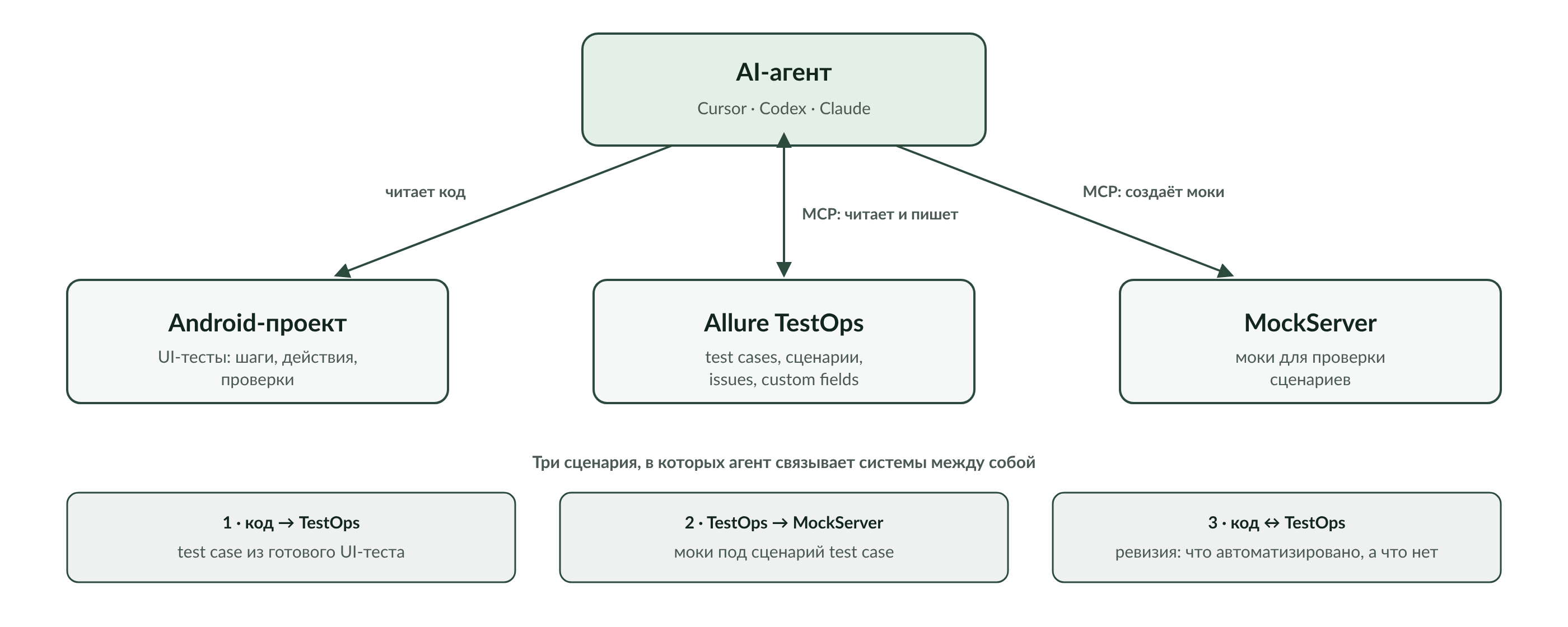
And this story turned out to be more interesting to me than the MCP itself. Because the problem was never that TestOps is inconvenient to open in a browser.
The real problem was different: the developer already works through an AI agent, while the tester still manually carries information between code, the TMS, and other tools.
Before the MCP, everything worked. Just by hand
Before this, there was no MCP integration with TestOps in our workflow at all. There was the regular Allure TestOps web UI.
Test cases were created through it, manually matched to automated tests, and someone had to manually make sure the documentation didn’t drift from the code. If a test needed mocks, those were prepared separately too.
The browser itself isn’t the problem here. It works fine for a human.
The problem shows up once part of the work is already done by an AI agent.
Take a simple task: there’s a working UI test in the code, and a test case needs to be created in TestOps based on it.
Without integration, the process looks roughly like this:
AI agent
    ↓
explains to the human what it found in the code
    ↓
human opens TestOps
    ↓
creates or edits the test case
    ↓
goes back to the agent
So the agent can analyze the code, but suddenly stops at the TestOps boundary. From there, the human becomes the transport layer between the two systems.
I wanted to remove exactly that spot.
Test code is already almost test documentation
Our Android project has a lot of UI tests.
They’re structured fairly similarly to how tests are described in a TMS: there’s a sequence of steps, each step performs an action, followed by assertions.
Roughly, the structure looks like this:
Step 1
  action
  assertions

Step 2
  action
  assertions

Step 3
  action
  assertions
In other words, most of the information for a test case already exists — just not in TestOps, but in the code.
Once the MCP was in place, I could tell the agent something like:
Create a test case based on this test.
From there, the agent reads the source UI test itself, parses its steps and assertions, and creates the corresponding test case in Allure TestOps.
What matters to me here isn’t the mere fact of generating text.
The agent isn’t inventing test documentation from scratch. The source is the code of a real, existing automated test. The MCP is only there so the result of that analysis can be written straight into the system where the test documentation lives.
Without the MCP, the same knowledge has to be manually moved from one representation to another.
With the MCP, both sides are available to the agent.
Android UI test → AI agent → TestOps
That’s the first useful scenario.
But it got more interesting from there.
When one MCP starts working together with another
We also have an MCP for MockServer.
And then you can give the agent a different task:
Create a mock to verify this test case from TestOps.
Now the source isn’t the code, but the test model.
The agent reads the test case from TestOps, understands the scenario, and creates one or more necessary mocks through the other MCP.
That produces a chain:
TestOps → AI agent → MockServer
And this, I think, is where it becomes clearest why you’d give an agent access to engineering systems at all.
If you think of the MCP purely as a way to click buttons in TestOps on the human’s behalf, the benefit really does look questionable. A human can just open a browser and do it themselves.
But an agent with access to several systems at once solves a different problem. It’s not moving text from one window to another — it’s carrying meaning between tools.
One place describes what needs to be checked. Another needs the environment prepared for that check. The agent sees both sides and can connect them within a single task.
                  ┌──────────────┐
                  │   AI agent   │
                  └──────┬───────┘
                         │
             ┌───────────┼───────────┐
             ↓           ↓           ↓
        Android code   TestOps   MockServer
To me, that matters far more than automating a single web interface.
So which tests are actually automated already?
The third scenario grew out of the same idea.
There’s a set of test cases in TestOps. There’s a set of UI tests in the Android project.
Periodically, you need to understand how well they match up:
- which test cases are already automated;
- which aren’t yet;
- which UI tests have matching documentation;
- where the test in code has changed but the description is still stale.
Doing this by hand means opening two systems and gradually matching entities between them.
The coding agent already has access to the source code. Once the TestOps MCP is connected, it gets the other side too.
Now it can be trusted with the audit itself.
This doesn’t look like plain CRUD over an API anymore. The value here comes from the model’s context: it reads two different representations of the same process and tries to find the correspondences between them.
These are exactly the kinds of tasks I now consider the most interesting for an MCP.
What the agent needed to be given
The server itself turned out small.
It’s a standalone stdio MCP built in Node.js. At its current stage, it provides ten tools for working with Allure TestOps: you can search and read test cases, create and delete them, read and update scenarios, and work with issues and custom fields.
It’s set up for Cursor, Codex, and Claude.
There were also quirks of the TestOps API itself to account for. For example, scenarios can be stored in two formats: the old flat /scenario format and the tree-shaped /step format. The client handles both.
This is exactly the kind of detail that’s nearly invisible to the MCP’s user, but without which the tool stops being reliable on real data.
At the same time, I deliberately don’t want to turn this article into documentation for ten tools. The list of tools isn’t the most interesting part of the project.
What matters far more is what kinds of tasks become possible once these tools show up in the agent’s working context.
Why the MCP became a separate project
The first implementation of the TestOps integration lived inside my meta-agent.
But a practical question came up fairly quickly: how would a tester actually use it?
She has Cursor. Making her deploy my whole meta-agent just to get access to TestOps made no sense.
So the integration was pulled out into a separate MCP server.
Now it’s an independent tool: it can be connected directly to a coding-agent environment and used without the rest of my infrastructure.
For me, this is also an important quality bar for internal AI tools.
As long as a tool only exists inside its author’s own environment, it solves my personal problem. Once it can be handed to a colleague and connected to her agent, it becomes part of the team’s workflow.
I didn’t write the MCP’s code
There’s one more detail that matters for this series of articles.
I didn’t write the code for this MCP at all. It was 100% written by a coding agent.
My job was defining the task and checking the result.
At first glance, you could say my role simply shrank. In practice, it shifted instead.
I had to figure out what was actually worth automating.
I could have asked the agent to build anything: a web wrapper, a script, another dashboard, a set of commands. But the useful solution turned out not to be an interface on top of TestOps, but access to the entities the agent needs for end-to-end work.
I had to decide which operations to expose to the agent.
I had to verify them against a real TestOps instance.
I had to recognize that the tool needed to be separate from meta-agent, because a different person would be using it in Cursor.
And, most importantly, I had to see the problem itself not as “the tester spends a lot of time in TestOps,” but as:
development has already become agent-driven, while a human is still manually connecting the agent to the rest of the engineering infrastructure.
The code, in this story, turned out to be the relatively easy part.
But write access is already a responsibility
The MCP has a less pleasant side too.
The more an agent can do on its own, the more carefully write operations need to be treated.
For example, the current implementation of updating a scenario in TestOps isn’t atomic.
It first deletes the existing scenario, then creates the new steps with sequential requests.
Simplified:
DELETE current scenario
POST step 1
POST step 2
POST step 3
...
There’s no rollback.
Which means that if the process is interrupted between deleting the old scenario and finishing the write of the new one, a test case could theoretically end up with a partially restored or empty scenario.
I don’t have a confirmed real incident of that kind of data loss, so it would be wrong to present this as something that has already happened.
But the risk exists in the code.
And that’s a good reminder: an MCP doesn’t turn an external service into a safe sandbox. If we let an agent change data, its tools need to be designed like a normal production client: with validation, tests, clear operation semantics, and, where possible, protection against partial changes.
The standalone version currently has six tests, and they pass. But some write operations — for example, changing issues/custom fields and deleting a test case — aren’t covered by dedicated tests yet.
So the project has a fairly concrete direction to strengthen.
So why does the agent need an MCP if I can just open a browser?
I can. So can the tester.
The question turned out to be framed slightly wrong.
The MCP isn’t there so a human never opens TestOps again.
It’s there so a human isn’t a mandatory middleman in every single operation between the AI agent and TestOps.
Once the agent gets access to several parts of the engineering loop at once, a different class of tasks appears:
code → TestOps

TestOps → MockServer

code ↔ TestOps
Create a test case from a UI test that actually exists.
Read a test case and prepare mocks for it.
Match test documentation against automation and find the gaps.
Taken one at a time, a human can do all of these through a browser, an IDE, and other tools.
But if every transition between systems needs a human, agent-driven development stops at the IDE’s border.
For me, that’s the main result of this small project.
We didn’t invent yet another way to manage TestOps.
We started removing the human from the role of transport protocol between code, the TMS, and the AI agent — leaving them with defining the task and checking the result.
This project is just one of the stories about how I use AI agents in real development. I’ve accumulated several of these by now: from Android tools and MCP services to personal portals, automation, and DSP. I’ve collected them on a separate page — “A galaxy of AI projects”.
There you can see what’s already been built, what tasks I handed to agents, and what those experiments turned into in the end. If any project catches your interest, write to me. There’s a good chance the next article will be about exactly that one.